1-Visitor
July 5, 2016
Solved

Is there a way I can restrict user from modifying CAD part in workspace without checkout. Currently windchill allows to modify if we select continue in creo conflict window. But changes are saved to windchill commonspace only when we checkout and che

  • July 5, 2016
  • 2 replies
  • 2186 views

Is there a way I can restrict user from modifying CAD part in workspace without checkout. Currently windchill allows to modify if we select continue in creo conflict window. But changes are saved to windchill common space only when we checkout and checkin.I have everything which is not checked out should be ready only or locked.
Best answer by lhoogeveen

I think you're talking about 'locking' workspace objects. The screenshots below were with Windchill 10.1.

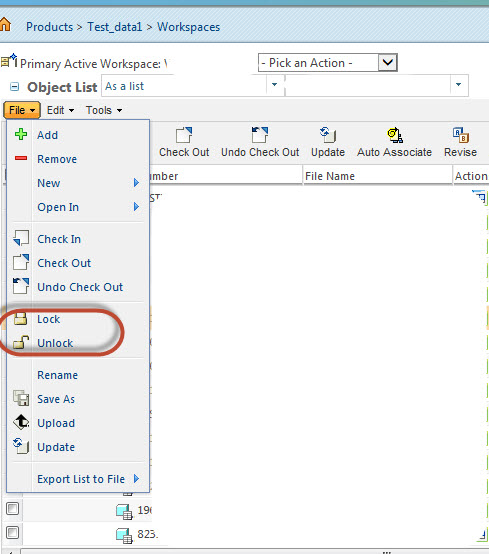
For the active workspace within Creo, you can manually select objects to lock:

Manually Lock Workspace Objects.jpg

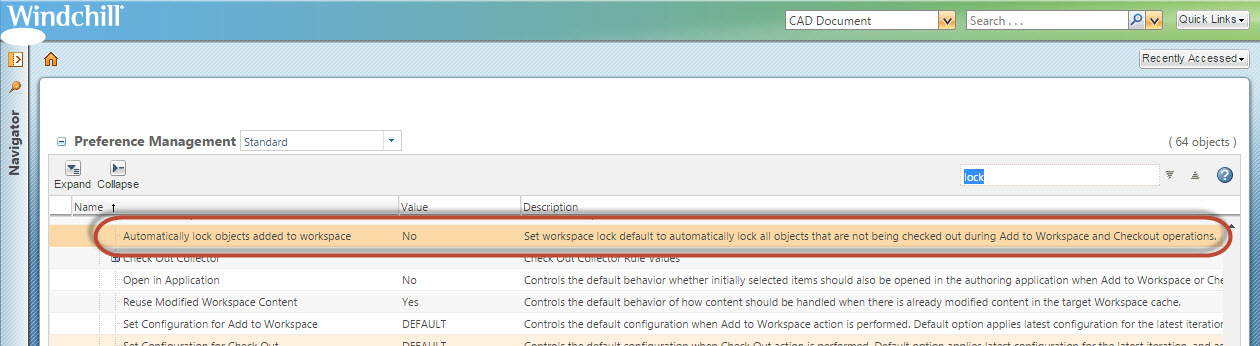
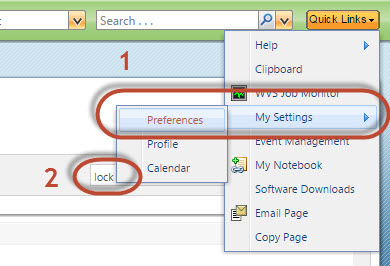
You can change the user's Windchill settings to lock objects automatically while being added to a workspace:

Windchill Auto 1.jpg

Automatically Lock Workspace CAD 1.jpg

2 replies

17-Peridot
July 5, 2016

I think you're talking about 'locking' workspace objects. The screenshots below were with Windchill 10.1.

For the active workspace within Creo, you can manually select objects to lock:

Manually Lock Workspace Objects.jpg

You can change the user's Windchill settings to lock objects automatically while being added to a workspace:

Windchill Auto 1.jpg

Automatically Lock Workspace CAD 1.jpg

1-Visitor
July 19, 2016

Use this with caution,

If other team members are modifying parts.

Our local work space is not synchronised until we unlock the parts which are added to work space.