

jbailey
18-Opal
Oct 9, 2024 12:24 PM UTC
Solved

Is there a way to set Change Task Asignee / Reviewer with template?

Version: Windchill 12.0


Use Case: Have a scenario where a Change Notice Template would be useful where specific tasks can be automatically assigned to certain roles or people. (I have WC 12 as the version, but will be migrating to WC 13)


Description:

Looking into creating change notice templates where we know who the assignee (and reviewer) should be for certain (or sometimes all) tasks. There isn't a way in the template to set assignee/reviewer.
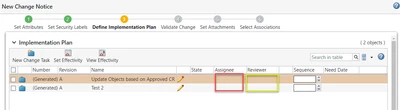
jbailey_0-1728476408066.png


12-Amethyst
Oct 21, 2024 5:45 PM UTC

Hi Jim,


You can edit the template, regardless of the CS. When you are in the Change Templates table, you just have to access the information page of the ECN template by clicking on the "i" icon.

If you don't see the process/team tab on the change task, that means it still uses a basic lifecycle template (this drives the creation of instance/object team)


Florent

18 replies

Catalina
Community Manager
Oct 14, 2024 10:12 AM UTC

Hi @jbailey,

Thank you for your question!

Your post appears well documented but has not yet received any response. I am replying to raise awareness. Hopefully, another community member will be able to help.

Also, feel free to add any additional information you think might be relevant. It sometimes helps to have screenshots to better understand what you are trying to do.


Best regards,

Translate
Catalina | PTC Community Manager
16-Pearl
Oct 15, 2024 5:48 AM UTC

Hi,

The Change Task template will have the Assignee and Review, not the Change Notice template. You need to check there to pre-populate.


Cheers

Hari

Translate
jbailey
jbailey18-OpalAuthor
18-Opal
Oct 15, 2024 1:49 PM UTC

@Hari_Vara - The Change Task Template is within the Change Notice Template... and you cannot set assignee/reviewer from there

Translate
12-Amethyst
Oct 17, 2024 5:35 PM UTC

Hello,


I suggest implementing CS154668.

However, when you create the ECN template, the system will not allow assignments.


But when your ECN template is created, navigate to each Change Task, and edit the team according to your requirements

Here is an example:

FlorentBRP_0-1729184822101.png


Unfortunately, you can only select users and groups but it is still a finding that made my day.


While writing this response, I found this CS20308 which is more or less what I described.


Florent


Translate
jbailey
jbailey18-OpalAuthor
18-Opal
Oct 17, 2024 9:05 PM UTC

I will have to go back and look at that... I implemented per that CS, but couldnt set on creation of the template, so I didn't go any further - I will look at it again and see if it works for me.

Translate