1-Visitor
January 6, 2015
Solved

Java Error!

  • January 6, 2015
  • 1 reply
  • 5774 views

Hi,

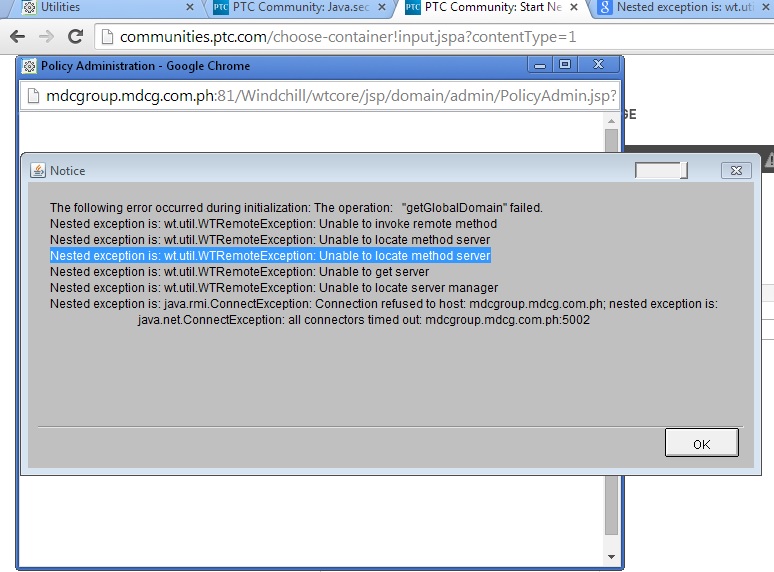
Can somebody help me howto fix this? I'm using java 8 update 25.

Untitled.jpg

Thanks in advance!!

Best answer by vostapenko

First, befor installing new Java, You must clean cache of java app.

Start -> JAVA-> Java Control Panel -> General- >Setings -> Delete Files ...-> All check box -> Ok

After install Java 7 in Control Panel disable "Auto Update".

I recomed Use IE 10-11 or Firefox >30

1 reply

12-Amethyst
January 6, 2015

You mast use Java plugin Version 7 update 60 (Get from Windchill10.2M022SoftwareMatrices081114.pdf)

Java 8 not support.

Luar1-VisitorAuthor
1-Visitor
January 6, 2015

Hi,

I tried to uninstall the version 8 and install the version that you said but it prompt me to install plugin and update the latest version of java.

Untitled.jpg

12-Amethyst
January 6, 2015

First, befor installing new Java, You must clean cache of java app.

Start -> JAVA-> Java Control Panel -> General- >Setings -> Delete Files ...-> All check box -> Ok

After install Java 7 in Control Panel disable "Auto Update".

I recomed Use IE 10-11 or Firefox >30