
1-Visitor
September 30, 2015
Solved

Launching PDF Viewable from Details Page

  • September 30, 2015
  • 6 replies
  • 2873 views

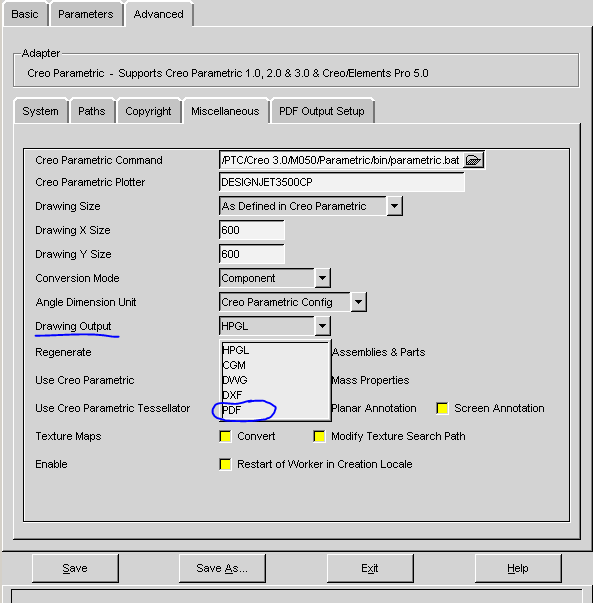
We have configured Windchill to create pdf files from publishing CAD model drawings. The desire is then to select the thumbnail on the cad document details page in Windchill and have Creo View open the created pdf file. However, what we are getting instead is Creo View opening a plt file instead. How do you set the selection of the thumbnail into Creo View as the pdf by default?
Best answer by TomU

You have to configure the cad worker to use PDF as the output for drawings.  Whatever is selected in this dropdown is what is opened by Creo View.

pdf.PNG

6 replies

TomU23-Emerald IVAnswer
23-Emerald IV
September 30, 2015

You have to configure the cad worker to use PDF as the output for drawings.  Whatever is selected in this dropdown is what is opened by Creo View.

pdf.PNG

1-Visitor
October 1, 2015

Tom - Thanks for the input. It appears that we missed this setting in a recent modification of the recipe file. I did not see the following:

adapter/outputDXFDrawing=4

Thanks!

slapha
15-Moonstone
September 30, 2015

Also depends on if they are already published. If you changed from HPGL to PDF then it will need to be republished as a PDF. If you're publishing both, then that's a different story and imagine you'd have to change the default representation somehow.

23-Emerald III
September 30, 2015

What are you seeing on the content tab under Representations/Annotations?

The image listed as Default is the one that will open in Creo View.

1-Visitor
October 1, 2015

Ben - The drawing thumbnail in the content tab, once selected, opens in Creo View as a .plt file. I think that we probably haven't properly set the recipe file to have drawings set for .pdf output.

Thanks!

23-Emerald IV
October 1, 2015

Just to elaborate on Steven's point above, when the drawing is published, whatever is selected in drawing output dropdown (shown above) is marked in the database as "SECONDARY".  Any other extra files that are published at the same time are marked as "ADDITIONAL FILES".  The object marked "SECONDARY" is what will get loaded into Creo View.  To change this without republishing would require you to go to the database and swap these two values on all of the affected objects.

publish_content.PNG

I'm sure this is not supported by PTC, so unless you have a great number of these it probably makes more sense to just republish them.