
1-Visitor
November 24, 2015
Solved

Ldap down so windchill won't start... Can anyone help?

  • November 24, 2015
  • 7 replies
  • 4541 views

We have 5 ldap servers and 1 of them will be off line for the next couple of days. Windchill will not come up and the only error that I have is that the ldap connection that is down fails to connect.

Is there a work around to get windchill up?

The error is (i hid the server path for business reasons):

2015-11-24 13:43:22,264 ERROR [main] wt.method.server.startup.services  - Failure to start manager wt.intersvrcom.StandardInterSvrComService

wt.services.ManagerException: Couldn't initialize wt.intersvrcom.InterSvrComService.

Nested exception is: (wt.pom.pomResource/0) wt.pom.PersistenceException: A persistence error occurred. System message follows:

Nested exception is: wt.util.WTException: com.infoengine.exception.adapter.IEAdapterException; nested exception is:

javax.naming.CommunicationException: address.hidden.for.business.reasons.net:3268 [Root exception is java.net.ConnectException: Connection timed out: connect]

Nested exception is: com.infoengine.exception.adapter.IEAdapterException; nested exception is:

javax.naming.CommunicationException: address.hidden.for.business.reasons.net:3268 [Root exception is java.net.ConnectException: Connection timed out: connect]

Best answer by BineshKumar1

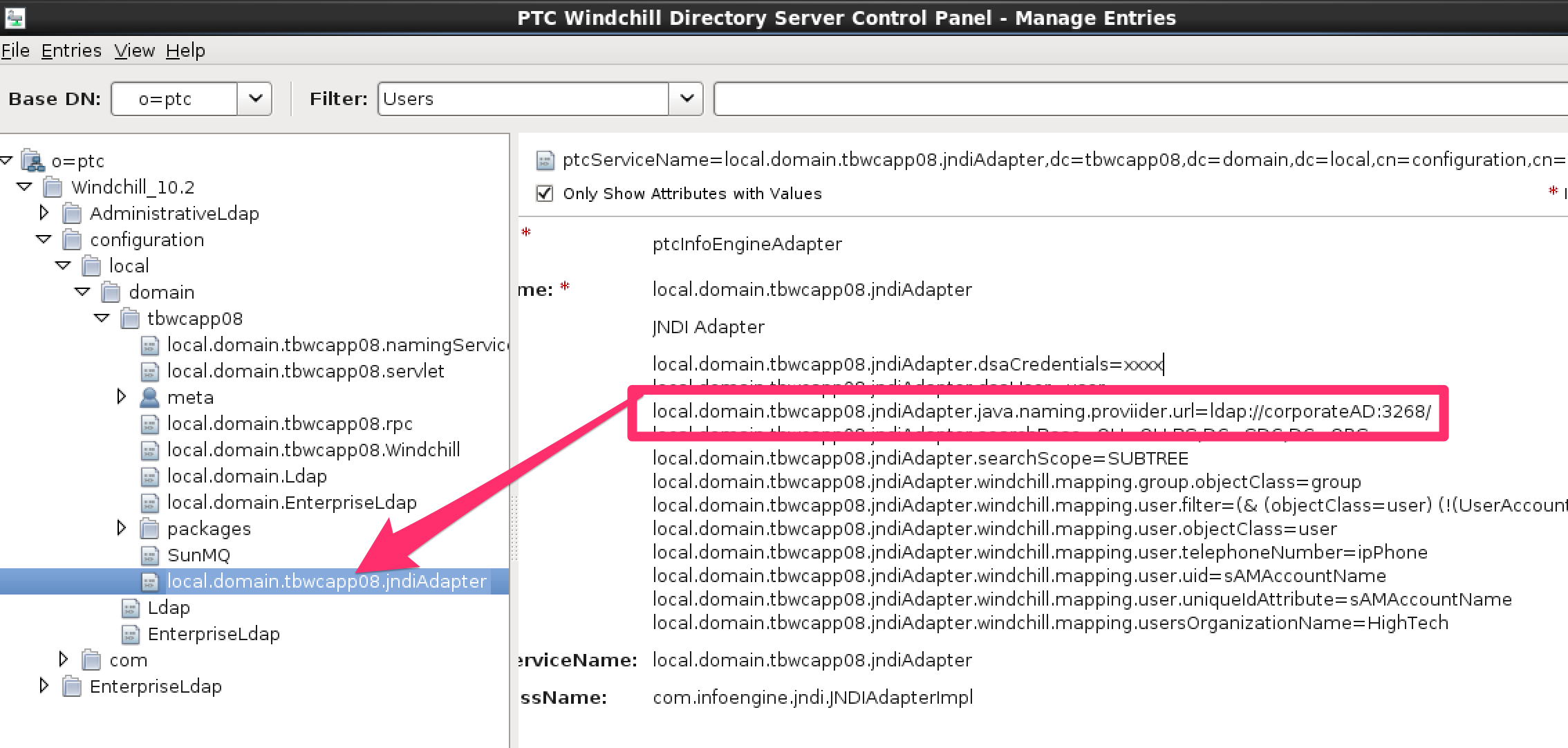
Do you know the JNDI adapter corresponding to the LDAP which is down? You can remove the adapter from wt.federation.org.directoryservices property from wt.properties and bring up the Windchill system.

You can get this information from the WindchillDS

jndiadapter.png

Remove the jndi adapter which has unreachable domain controller from wt.properties and restart Windchill

wt.properties.png

Thank you,

Binesh Kumar

7 replies

1-Visitor
November 24, 2015

Windchill requires a functional LDAP to connect to in order to run.  If the LDAP server that has Windchill's informatoin is going to be down, then the LDAP contents must be duplicated to a different server and the Windchill properties that call the LDAP host/port information must be updated to point to that new server.

sconrad1-VisitorAuthor
1-Visitor
November 24, 2015

Thanks for the reply Bob, of the 5 LDAP servers, 4 of them are functioning. Only 1 is not, but from what I understand, all ldap servers that are connect to  windchill have to report in order for the method servers to come up.

Is this correct?

Is there a work around for if 1 server goes off line?

I can't have 300+ people not working just because 1 ldap server went down.

1-Visitor
November 24, 2015

If you have your Windchill LDAP contents split up across multiple servers, then yes I would imagine they would all need to be up.  I say "would imagine" because in my experience the LDAP for Windchill is typically contained to one server, usually the WC application server (if using WindchillDS) or the server that your corporate LDAP is contained (if using external JNDI adapter to connect to that LDAP).

I assume you are using your corporate LDAP governed by the port 3268 in your error message as opposed to the default 389 from WindchillDS, is this correct?  Can you explain why you have 5 LDAP servers together?  Maybe there's a way to encapsulate the Windchill information to a specific server and move that as necessary ...

2-Explorer
November 24, 2015

Do you know the JNDI adapter corresponding to the LDAP which is down? You can remove the adapter from wt.federation.org.directoryservices property from wt.properties and bring up the Windchill system.

You can get this information from the WindchillDS

jndiadapter.png

Remove the jndi adapter which has unreachable domain controller from wt.properties and restart Windchill

wt.properties.png

Thank you,

Binesh Kumar

sconrad1-VisitorAuthor
1-Visitor
November 24, 2015

I just got off a session with PCT and that is exactly what I had to do.

We found the adapter in windchillDS then removed that adapter from the wt.properties and propagated it through windchill shell then started the services.

That did the trick.

Thanks for your help guys. I appreciate it.

22-Sapphire I
November 25, 2015

If you get desperate, you can return the Apache files to the OTB condition such that they ignore external LDAP and just use user accounts defined within Windchill.  We had to do that twice several years ago.  Not the best for sure but can continue working at least.