
14-Alexandrite
October 27, 2025
Question

List Running promtion request process

  • October 27, 2025
  • 4 replies
  • 590 views

Version: Windchill 12.1


Use Case: I want to list all (promotion) processes that are currently running


Description:

Hi All


I have a small issue that i don't understand

I below a part of the process tab of a promotion request. As you can see the process is still running. 

2025-10-27 18_38_20-VPN - VMware Workstation.png

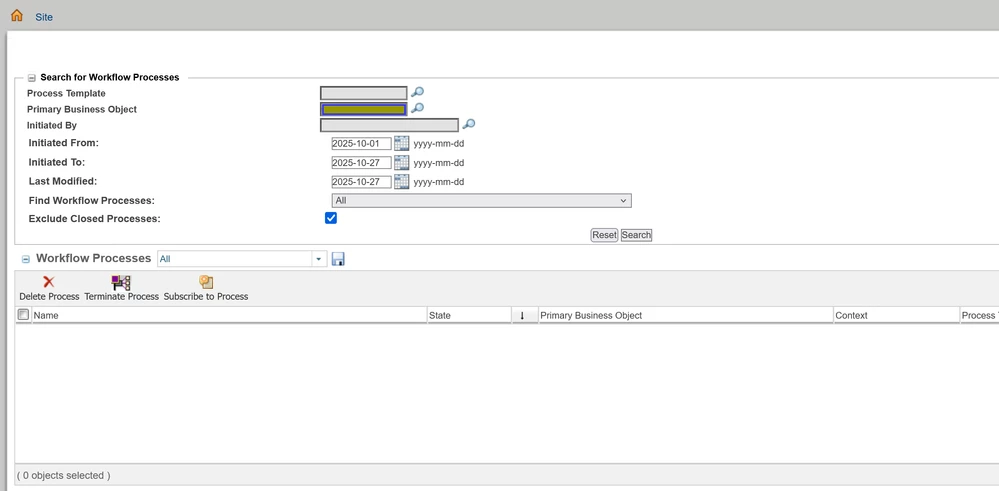
But when i lookup the same process is don't result in any processes.
2025-10-27 18_49_59-VPN - VMware Workstation.png

I'm sure the process isn't finished. because for example in the promotion request there is a model with where the previous released version was B.2. It is now revised and the current released  version should become C.4. when the promotion process is over the B.2 should get the state 'replaced'. And (at least )not all of the objects has changed.

The reason i ask this is that i want all still running processes (i know there are more, but i don't want to check every promotion / change request etc manually)

Am i doing something wrong? OR is it possible that because of a (automatic)restart the process is corrupted? OR is it something else?


Additional info:

I also have tested the required promotion process template but then i don't see this running process

4 replies

joe_morton
18-Opal
18-Opal
October 27, 2025

Try removing the "Last Modified" date? Is it possible the workflow wasn't modified today, and so it's getting excluded?

jw_CS14-AlexandriteAuthor
14-Alexandrite
October 28, 2025

Oke this give in this case the expected result

Do you know if it is possible to search within Primairy Business Object ALL promotion requests and a single one?

If i choose Process template it shows also the objects inside the promotion process (WtPart, CAD models etc).

Community Moderator
November 12, 2025

Hi @jw_CS,


I wanted to see if you got the help you needed.

If so, please mark the appropriate reply as the Accepted Solution. It will help other members who may have the same question.
Of course, if you have more to share on your issue, please pursue the conversation.    


Thanks,
Anurag 

16-Pearl
October 28, 2025

Hi @jw_CS ,


Get all the open promotion process using the following filters.

TDT_0-1761632931632.png


jw_CS14-AlexandriteAuthor
14-Alexandrite
October 28, 2025

@jw_CS  wrote:

Additional info:

I also have tested the required promotion process template but then i don't see this running process


That is what i meant with this sentence. and also in this case the expected process don't show up.

Marco Tosin
21-Topaz I
21-Topaz I
October 28, 2025

Try using a query builder report to see which processes are open.


How to display all open tasks for all users on my homepage


Please also take a look at this article summarizing the data model for workflows.


Windchill Data Model for Workflow related objects


Marco
Fadel
23-Emerald I
October 28, 2025

you can further develope bzlow query ; 


select pn.name, m.name as WfTemplateName, pn.ida2a2 as PromotionRequestIDa2a2, p.businessobjreference, p.name as WfProcessName
from wfprocess p, wfprocesstemplate wft, wfprocesstemplatemaster m, promotionnotice pn
where wft.ida2a2 = p.ida3a5 and m.ida2a2 = wft.ida3masterreference
and p.businessobjreference like concat(concat('%', trim(to_char(pn.ida2a2,'9999999999999'))),'%');

Fadel_0-1761656296162.png


Buiꓘa