
13-Aquamarine
February 8, 2023
Solved

Managing PDF Drawings in Windchill

  • February 8, 2023
  • 3 replies
  • 2636 views

Hi all,


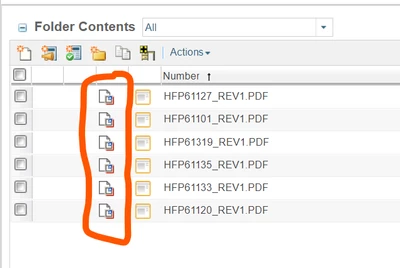
My company recently started using Windchill. Whenever I export a PDF, the PDF created gets its own part number. However, I would like to have the PDF exported as an attachment to the part referenced in the drawing. Alternatively, I would like to have the PDF exported to an attachment to a WTPart.


Is there any way to do this? Please let me know! Thank you in advance for your help!
 

JiffiPop_0-1675871310100.png


Thank you,
Jeff


Best answer by Chris3

You are going to want to read through the article below which explains how to set up server side PDF publishing:

https://www.ptc.com/en/support/article/CS111916 

3 replies

23-Emerald III
February 8, 2023

How are you generating your PDF files?

We use Creo and publish the PDFs automatically and they become attached as content to the main Creo file (part/assembly/drawing).

JiffiPop13-AquamarineAuthor
13-Aquamarine
February 8, 2023

Hi Ben,


Thanks for your quick response. I use the export feature next to save as. Then, I simply export it to my Workspace, and it comes in as a new file. There is no checkbox to have it added to the part referenced in the drawing, or to the drawing file itself.

JiffiPop_0-1675872387380.png

This is the only way I know to export a PDF drawing, but maybe there is another way? Perhaps it's possible our Windchill has different settings for how Windchill should handle newly exported PDFs?


Thank you,

Jeff


Chris3
Chris321-Topaz IAnswer
21-Topaz I
February 8, 2023

You are going to want to read through the article below which explains how to set up server side PDF publishing:

https://www.ptc.com/en/support/article/CS111916
