16-Pearl
October 20, 2021
Solved

MAPSB Equivalence Link to Self (when self view was reassigned)

  • October 20, 2021
  • 1 reply
  • 3106 views

MAPSB helped needed.

How we intend to use MAPSB. We have an eBOM in As Designed view.

We have common Standard headwear and COTS items that are only in mBOM view of Staged.

When transforming an eBOM for manufacturing, we will duplicate and propagate the entire assembly. COTS and Standard Staged view will be copied over to the mBOM.

eBOM As Designed parts will have a Staged equivalent created.


Before we started using mBOM and MAPSB we used a "Modeled" view for eBOM now that PTC has fixed the issue with CAD changes overwriting BOM changes we had no reason to maintain a engineering Modeled view and a BOM manger view of As Designed so converted all single view Modeled parts to As Designed.


In MAPSB we see that a view (As Designed) in the Upstream has a downstream equivalent Objects.

Some parts show an identity of part # (As Designed) with latest downstream of part # (As Designed) with upstream of Modeled.

If we look at that part it only has As Designed (looking at History)

In MAPSB we also see part # (As Designed) with downstream of part # (Staged) with upstream of As Designed.


Question.

Is that first equivalent a ghost of when we had a Modeled view?

Is there a way to remove that link? I do not see an option.

Is there a way to update the downstream to show the Staged view. No matter what I do it always shows the As Designed. Perhaps MAPSB is having problems with equivalent to self?
{0FE44925-5FF9-4278-B098-870B296C5517}.png.jpg

Best answer by HaithemBouajila_362234

Hello @lgrant , 

I let peers answer question 1 and 3.

Regarding question 2 here is the procedure to remove the equivalence link :

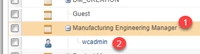
  • Perquisite: add to container team the role " Manufacturing Engineering manager  " and assign your user (or the relevant group) to it
    image2021-9-15_17-57-41.png
  • Open MAPSB 
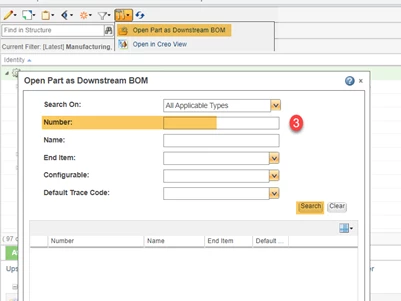
  • Open the part as downstream BOM (you can use part number) 
    image2021-9-15_17-59-27.png
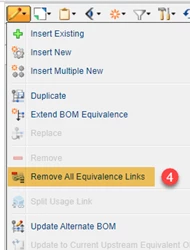
  • No the "Remove all Equivalence Link" will be ungrayed, use it to remove this undesired equivalence link 
    image2021-9-15_18-0-6.png

I hope this can help you.

Kind regards, 

Haithem 

1 reply

7-Bedrock
October 22, 2021

Hello @lgrant , 

I let peers answer question 1 and 3.

Regarding question 2 here is the procedure to remove the equivalence link :

  • Perquisite: add to container team the role " Manufacturing Engineering manager  " and assign your user (or the relevant group) to it
    image2021-9-15_17-57-41.png
  • Open MAPSB 
  • Open the part as downstream BOM (you can use part number) 
    image2021-9-15_17-59-27.png
  • No the "Remove all Equivalence Link" will be ungrayed, use it to remove this undesired equivalence link 
    image2021-9-15_18-0-6.png

I hope this can help you.

Kind regards, 

Haithem 

lgrant16-PearlAuthor
16-Pearl
November 19, 2021

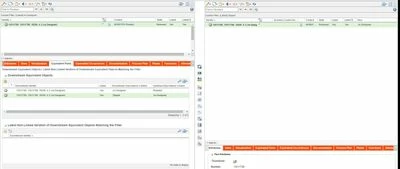
Thanks, I think we can do the same thing (let me know if not) by selecting the part in the upstream panel, then within the same left side view on the Equivalence tab,  select that downstream equivalent part (that we don't want) and display in Downstream panel, then within the same right side panel on it's equivalence tab select the part and use the icon to remove equivalence link.

lgrant_2-1637331657618.png


7-Bedrock
November 19, 2021

Hello Igrant, 

Indeed you can do it this way. 

My suggestion was regarding the deletion of all equivalent links for this part and recreate them as they seem to be not correct.

Regards, 

Haithem