
1-Visitor
September 1, 2015
Solved

Markup and Annotation Report in Windchill - Need help Building URL to open the file in Creo View

  • September 1, 2015
  • 4 replies
  • 6425 views

Hello Gurus,

I've written a report that returns all the markups and annotations against a particular CAD document and/or particular user. The problem is that when the object that the markup was created against is no longer the latest, the UI does not allow the user to view or open the markup. Bug? PTC Case logged!

  Anyhow, i am trying to recreate the URL in the report that launches the markup in Creo View. I have been able to get all of the necessary data except for the application data id for the markup. Can anyone help me figure out the right way to get the application id linked and pulled into the report?

For the joins i have the following:
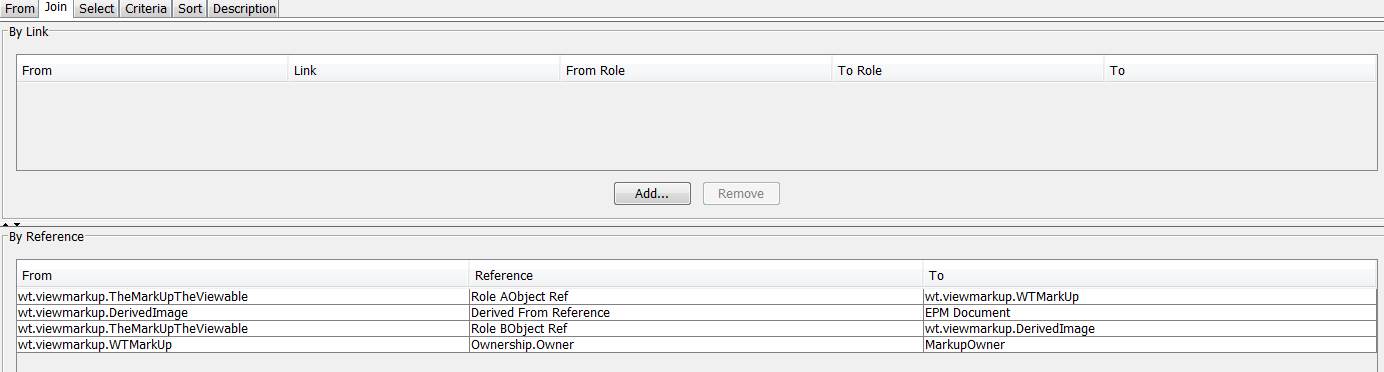
Annotation Join Tab.jpg

wt.viewmarkup.WTMarkUp - Role AObject Ref - wt.viewmarkup.WTMarkUp

wt.viewmarkup.TheMarkUpViewable - Role BObject Ref - wt.viewmarkup.Derived Image

wt.viewmarkup.Derived Image - Derived From Reference - wt.epm.EPMDOCUMENT

wt.org.WTUser - Ownership.Owner - wt.viewmarkup.WTMarkUp


I am building the URL as a concatenation as shown in the image below. I need to pull in the application id somehow and place it in the APPLICATION DATA ID placeholder.
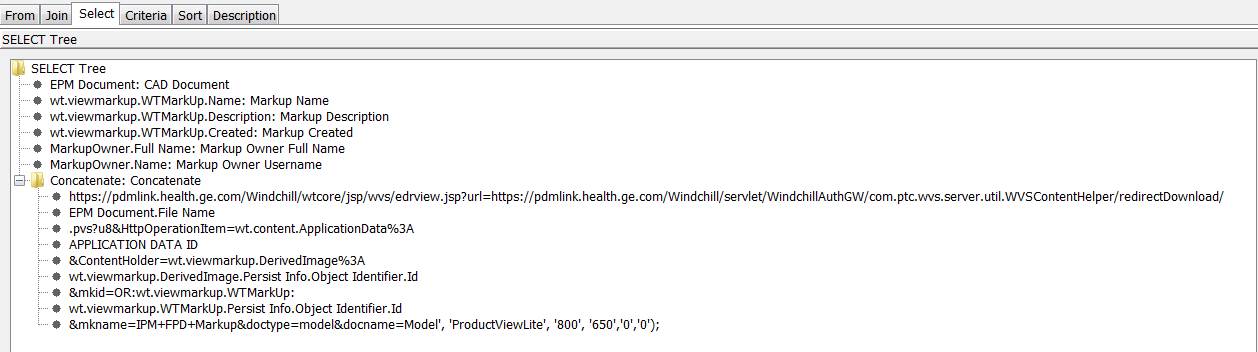
Annotation Report Select Tab.jpg


Any help you can provide will be greatly appreciated.


Best Regards,

Dax Williams

Best answer by dwilliams

Bill and Chris,

Thank you for your replies. I tried the Application Data linked to the WTMarkup through the content to holder link and everything linked fine. However, the URL wouldn't resolve using the application persist info id.

I was able to get the report working without linking the Application Data table. I used the persist info id from EPMDocument table. With this id, I am now able to open the annotation in Creo View directly from the report.

I realize this is just a workaround and we should be able to get to these annotations without this reverse engineered url. I am working with PTC to figure out why they are disappearing from the UI. However, this report is nice to easily find the annotations by a user or object and have a quick link to pull it up in Creo View.

I don't see anyway to attach the updated report to my reply, so if anyone is interested in this report please let me know and I can send it via email.

Thank you for your expertise,

Dax

4 replies

16-Pearl
September 1, 2015

I don't have a solution to the URL problem...but have you thought about enabling copy forward so the markup is attached to the latest?  I am able to open the annotation set from an older iteration when active in the information page (customized to show version history and reps)...maybe you can get the URL from this page to help reverse engineer what you are doing.

Capture.JPG

13-Aquamarine
September 1, 2015

I'm not too familiar with query builder. But on the DB level, WTMarkup and ApplicationData are linked through the HolderToContent table. HolderToContent's idA3A5 field points to the entry in WTMarkup and HolderToContent's idA3B5 field points to the entry in ApplicationData.

dwilliams1-VisitorAuthorAnswer
1-Visitor
September 2, 2015

Bill and Chris,

Thank you for your replies. I tried the Application Data linked to the WTMarkup through the content to holder link and everything linked fine. However, the URL wouldn't resolve using the application persist info id.

I was able to get the report working without linking the Application Data table. I used the persist info id from EPMDocument table. With this id, I am now able to open the annotation in Creo View directly from the report.

I realize this is just a workaround and we should be able to get to these annotations without this reverse engineered url. I am working with PTC to figure out why they are disappearing from the UI. However, this report is nice to easily find the annotations by a user or object and have a quick link to pull it up in Creo View.

I don't see anyway to attach the updated report to my reply, so if anyone is interested in this report please let me know and I can send it via email.

Thank you for your expertise,

Dax

1-Visitor
September 2, 2015

That's great Dax and thanks for this report. This is very useful.

Could you update the Resource for reporting with this one?

dwilliams1-VisitorAuthor
1-Visitor
February 12, 2016

I have made some changes since originally getting this solved. The link below is to the latest version of the report I have:

https://www.ptcusercommunity.com/servlet/JiveServlet/download/8686-2-112284/EPMDOCUMENT_Markup%20and%20Annotation%20Report.qml.zip

Best Regards,

Dax

21-Topaz I
February 15, 2016

Thank you for this Dax.

I have one question.  I deleted some published view but noticed after running it again they were still listed in the report.  Any idea why?  I am on 10.1 and it runs fine.  Could that be the reason?

dwilliams1-VisitorAuthor
1-Visitor
February 15, 2016

Hi Steve,

When I delete the annotations in Windchill 9.1, they are removed from the report. I tried deleting from both the Windchill and Creo View UI's and in both cases, it removed it from the report. I would assume the behavior to be the same in Windchill 10.1 but I have no way to test.

How are you deleting the annotations? This may give us some indication as to why we are seeing a difference.

Best Regards,

Dax