
17-Peridot
November 11, 2016
Solved

MODELCHECK_DIR location in Windchill

  • November 11, 2016
  • 1 reply
  • 1758 views

Iam done with creating and testing ModelCHECK configuration files and now I would like to store these files in Windchill and point the MODELCHECK_DIR to this location and do another round of testing with different users globally.

Iam not able to figure out how do I add these files to a specific folder in our CAD library in Windchill.

Any suggestions appreciated.
Best answer by Vermont_95

Hello

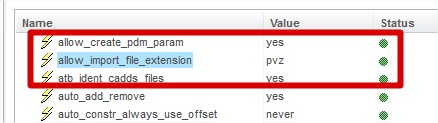
when I want to import files in Windchill I used this option

Creo Parametric Options.jpg

then I change in session the extention value like .mcc or .mc

then you click on import to workspace in the browser of Creo Parametric

you can then check in any file in windchill

you just need to do each extention  file

Regards

Veronique

1 reply

14-Alexandrite
November 17, 2016

Hello

when I want to import files in Windchill I used this option

Creo Parametric Options.jpg

then I change in session the extention value like .mcc or .mc

then you click on import to workspace in the browser of Creo Parametric

you can then check in any file in windchill

you just need to do each extention  file

Regards

Veronique

17-Peridot
November 18, 2016

That's awesome. Thank you. I was now able to move the files to my library in Windchill.

This option is something new for me.