4-Participant
February 9, 2024
Question

Modifications to Locked Files using SolidWorks

  • February 9, 2024
  • 1 reply
  • 725 views

Hello All,


This was a previous post I had about the same topic. https://community.ptc.com/t5/Windchill/How-to-prevent-any-modifications-to-CAD-objects-in-Workspace/m-p/927120#M77779


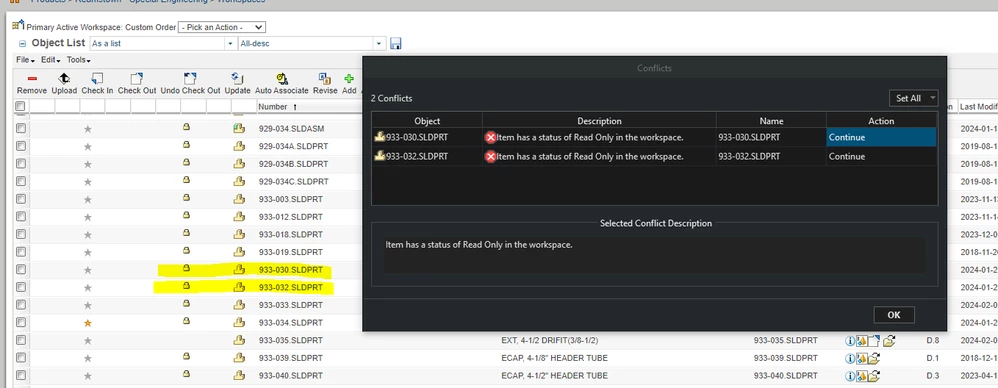
Here is some additional screenshots of what happens.  These 2 parts are components in an assembly, when I saved this Assembly I get this Conflict, these parts are locked.  The only option allowed is Continue, which then unlocks the file and has a "modified locally" tag.  This should not be allowed to happen to a locked file, whether it's state is "Released" or "In-Work".  How can this be prevented?
mikebuchter_0-1707502251792.png

mikebuchter_1-1707502328663.png


1 reply

17-Peridot
May 10, 2024

This could in fact be a "feature" of how WGM behaves with Solidworks with the version of WGM you have. 

What was linked in  your previous post (CS355979) could be at play here. 


You said there this only happens for parts that are in assemblies? So when you save the assembly is when this happens? 

We run NX and this happens when there are some relationships between the assembly and the part that get updated which makes NX think that the part is changing. That triggers the "part is locally modified" icon... 


Have you seen this already from PTC Help Center

Dobi_0-1715354022940.png

To me this reads as: 

- the assembly is saved such that there's some modification (likely mating reference) that gets updated or refreshed on open

- this makes SW think the file (that's open at that point as a dependent) is modified


Timing issue for when the lock is set, perhaps?