

avillanueva
23-Emerald I
23-Emerald I
November 17, 2023
Solved

Moved objects still show old context in iteration history

  • November 17, 2023
  • 2 replies
  • 3107 views

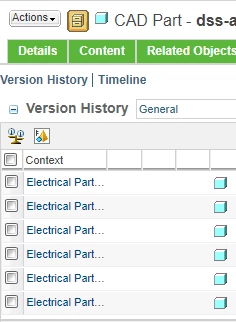
I was doing some cleanup and moving objects from a product area to a library. I noticed that the older iterations still show in the iteration history as being part of the original context. Is this normal? any reason for concern? I would assume that a moved would move the object and its history to the new context.  I did choose to move All versions which was the default.
Best answer by avillanueva

Well, that fixed it. I moved it to a third context it all updated. Perhaps the move command does not change context if I was just moving folders. when I moved to a new context, all previous iterations were fixed. I think I can clean this up. @Fadel, I am going to chalk this up to a very old installation of Windchill. We started life on PDMLink 7 so this could have been an issue from back then. I can use your QML to find them and clean them up.

avillanueva_0-1700490188268.png


2 replies

Fadel
23-Emerald I
November 17, 2023

Does Windu task DetectMasterWithDifferentContextDT reports any potential error ?

what option has been chosen when moving objects 

Fadel_0-1700233735257.png


Buiꓘa
avillanueva
23-Emerald I
23-Emerald I
November 17, 2023

Versions were moved and I did have All version checked. I ran DetectMasterWithDifferentContextDT and it return 0 issues. Here is what I see:

avillanueva_0-1700243055467.png

Its not the versions, its the iterations that show with the old context. Is this normal?  I can purge them but I would have expected in a Move, that all iterations would be updated.


Fadel
23-Emerald I
November 18, 2023

Would share the result of below QMl run with the give EPM number 

Buiꓘa
joe_morton
18-Opal
18-Opal
November 17, 2023

Sounds weird to me.. like it didn't actually move all the versions.

If you open the info page for one of the old versions, what context does it show in the bread crumbs?