
17-Peridot
February 22, 2023
Solved

Multi-level components report doesn't show correct consolidated quantities

  • February 22, 2023
  • 1 reply
  • 1123 views

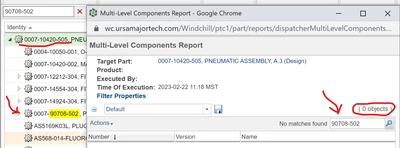
We use the Multi-level Components Report a lot for getting consolidated quantities in a single sheet. And then today, I ran into a case where it's telling me I have no quantities of a part on a BOM when I'm in fact looking at the part on that BOM. 


Is this a bug or am I missing something obvious? 
Dobi_0-1677090151453.png


Best answer by Dobi

I'll add a clarification here that I think answers my own question:

Since the part I'm looking for is a top-level assembly (0007-90708-502 above), it's excluded from the consolidated components list. Therefore when I'm looking to count it (as an Inseparable Assembly) to compare to what we have in inventory, the Multi-Level Component List will not give me what I want. 


Instead, I have to export out the full structure as a multi-level BOM and then in Excel find and consolidate the quantities myself. 


With that in mind, is there a recommendation on how to get counts of "assemblies" that are kind of like end products? Is changing the part type the right thing to do? 

1 reply

Dobi17-PeridotAuthorAnswer
17-Peridot
February 22, 2023

I'll add a clarification here that I think answers my own question:

Since the part I'm looking for is a top-level assembly (0007-90708-502 above), it's excluded from the consolidated components list. Therefore when I'm looking to count it (as an Inseparable Assembly) to compare to what we have in inventory, the Multi-Level Component List will not give me what I want. 


Instead, I have to export out the full structure as a multi-level BOM and then in Excel find and consolidate the quantities myself. 


With that in mind, is there a recommendation on how to get counts of "assemblies" that are kind of like end products? Is changing the part type the right thing to do?