
20-Turquoise
January 11, 2023
Solved

"My Tasks" table missing the 3 multi task related icons/actions after upgrade 12.0.2.9 to 12.1.2.0

  • January 11, 2023
  • 14 replies
  • 3781 views

After upgrade from 12.0.2.9 to 12.1.2.0 the "My Tasks" table on the home page is missing the 3 multi task related icons and actions. The 3 missing icons/actions are: Accept Tasks, Reassign Tasks, and Decline Tasks.

I have not made any changes to anything related to roles besides upgrading that I am aware of.


This affects all users except for wcadmin. In the screenshot below the left is "normal" user and the right is wcadmin. Note the 3 highlighted icons and actions for wcadmin that are missing for the normal user.
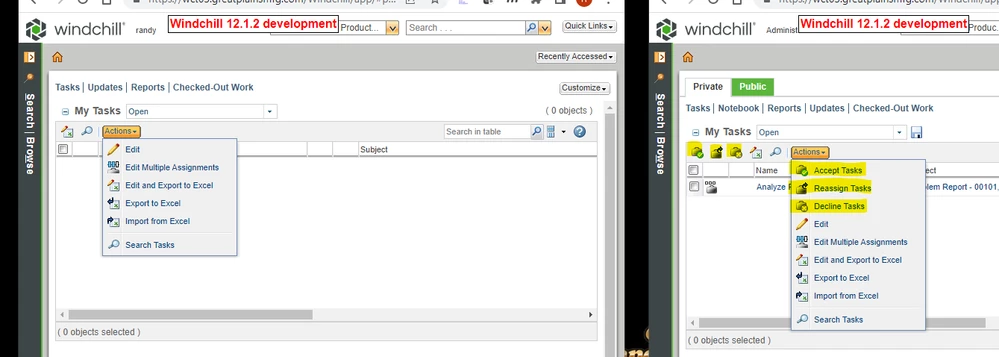


comparision_tasks_table.png


Digging into it with jcaDebug=1 shows these are actually "removed by role-based check". See screenshot below:
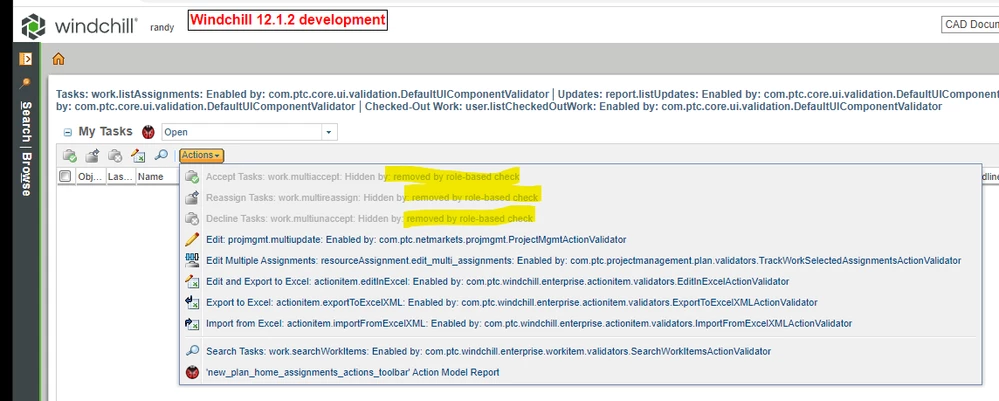
 

tasks_table_removed.png


I do have a call open with PTC but haven't gotten any solution yet.


Anybody here have ideas for me to test?


Best answer by RandyJones

Getting back to this issue. PTC has created article CS392919 and spr 14614107

Description of the spr is this:

"After windchill upgrade from 12.0.2 to 12.1.2, UIAccess records for newly introduced uiComponents (such as WORKITEM_MULTI_REASSIGN, WORKITEM_MULTI_ACCEPT, WORKITEM_MULTI_DECLINE) are not present in database table UIAccess for already existing custom"


The workaround in the article is to export and re-import all custom profiles. Which after doing so will add entries in the uiaccess table. So like @TomU mentioned the upgrade manager failed to "recalculate all custom user profiles".


One can inspect the lack of and the change to these uiaccess entries by using  the following sql query before and after re-importing the profiles or editing the profiles:

select *
from UIAccess 
where ida3a3 in
(select ida2a2 from standardprofile 
where name like '<Your custom profile name here') and uiComponent in ('WORKITEM_MULTI_ACCEPT','WORKITEM_MULTI_REASSIGN','WORKITEM_MULTI_DECLINE');

14 replies

23-Emerald IV
January 11, 2023

They show up fine for my 'normal' (non-administrator) user account.

TomU_0-1673460904496.png


Take a look at the profile(s) associated with your user account.


TomU_1-1673460963704.png


TomU_2-1673460999886.png


23-Emerald IV
January 11, 2023

Also look at the license profiles associated with your account.  For example:


TomU_3-1673461198072.png


20-Turquoise
January 11, 2023

I had not looked at that however mine are as expected:


base_license_profile.png


20-Turquoise
January 11, 2023

More information on this. PTC has changed the action definitions on these from 12.0.2.9 to 12.1.2.0. The change is these actions now include a  uicomponent="WORKITEM_MULTI_xxxxx".

12.0.2.9 action:
<objecttype name="work" class="wt.workflow.work.WorkItem" >
 <action multiselect="true" name="multireassign" selectRequired="true" >
 <includeFilter name="projectM4D"/>
 <command method="multireassign" class="com.ptc.netmarkets.work.NmWorkItemCommands" windowType="popup"/>
 </action>
</objecttype>

12.1.2.0 action:
<objecttype name="work" class="wt.workflow.work.WorkItem" >
 <action multiselect="true" name="multireassign" uicomponent="WORKITEM_MULTI_REASSIGN" selectRequired="true" >
 <includeFilter name="projectM4D"/>
 <command method="multireassign" class="com.ptc.netmarkets.work.NmWorkItemCommands" windowType="popup"/>
 </action>
</objecttype>

I have discovered that redefining the actions and removing the uicomponent="WORKITEM_MULTI_xxxxx" restores these missing actions to the "My Tasks" table. So for a workaround until the real issue is figured out I have redefined these 3 actions in custom-actions.xml as follows:


<!--
	From NetMarkets-actions.xml
	Redefine to delete the uicomponent="WORKITEM_MULTI_DECLINE" part of the action.
	This is new in 12.1.2.0 over 12.0.2.9 and is causing these actions to be hidden
	for all users except for wcadmin in the My Tasks table.
	See https://support.ptc.com/apps/case_logger_viewer/auth/ssl/case=16698063
	
	This is a workaround until we can come up with a permanent solution.
-->
	<objecttype name="work" class="wt.workflow.work.WorkItem" >

		<action multiselect="true" name="multiaccept" selectRequired="true" >
			<includeFilter name="projectM4D"/>
			<command method="multiaccept" class="com.ptc.netmarkets.work.NmWorkItemCommands"/>
		</action>

		<action multiselect="true" name="multireassign" selectRequired="true" >
			<includeFilter name="projectM4D"/>
			<command method="multireassign" class="com.ptc.netmarkets.work.NmWorkItemCommands" windowType="popup"/>
		</action>

		<action multiselect="true" name="multiunaccept" selectRequired="true" >
			<includeFilter name="projectM4D"/>
			<command method="multiunaccept" class="com.ptc.netmarkets.work.NmWorkItemCommands"/>
		</action>

	</objecttype>


RandyJones20-TurquoiseAuthorAnswer
20-Turquoise
August 8, 2023

Getting back to this issue. PTC has created article CS392919 and spr 14614107

Description of the spr is this:

"After windchill upgrade from 12.0.2 to 12.1.2, UIAccess records for newly introduced uiComponents (such as WORKITEM_MULTI_REASSIGN, WORKITEM_MULTI_ACCEPT, WORKITEM_MULTI_DECLINE) are not present in database table UIAccess for already existing custom"


The workaround in the article is to export and re-import all custom profiles. Which after doing so will add entries in the uiaccess table. So like @TomU mentioned the upgrade manager failed to "recalculate all custom user profiles".


One can inspect the lack of and the change to these uiaccess entries by using  the following sql query before and after re-importing the profiles or editing the profiles:

select *
from UIAccess 
where ida3a3 in
(select ida2a2 from standardprofile 
where name like '<Your custom profile name here') and uiComponent in ('WORKITEM_MULTI_ACCEPT','WORKITEM_MULTI_REASSIGN','WORKITEM_MULTI_DECLINE');