New CAD worker setup issues
Version: Windchill 13.0
Use Case: Brand new Windchill upgrade, brand new VMs for new CAD workers with clean installations... that don't work.
Description:
This is perhaps a mix of both a rant and request for assistance.
We are in process of testing Windchill 13.0.2.1. The rehearsal system is up and running and for the publishing environment I made new VMs to house the worker instances.
| Worker 1 |
NX instance 2 Creo instances 1 Office |
| Worker 2 |
NX instance 2 Creo instances |
| Worker 3 | NX instance |
For the workers, I went with:
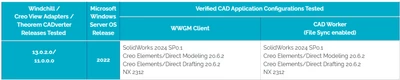
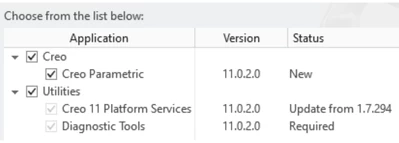
Creo View Adapter version 11.0
Windchill Workgroup Manager 13.0.2.1
Creo 10.0.6.0
NX2306.8101
Office 365.
The VMs all have Windows Server 2022 Datacenter for OS.
It's not my first time setting up CAD workers so I figured 20-th time is the charm to get it right the first time... especially since my current production setup is running so well (actually true!).
So, I did all the installations first.
- FlexNet Server version was important for Creo (CS154266 ) so that happened.
- WGM 13 comes with Creo 11 Platform Services, Creo 10 comes with Creo 10 Platform services. That's fine because I have the CREO_AGENT_PATH_EXE set (CS292414 )
- Then set up individual worker daemons for each instance (CS49182 )
- Updated the hosts files on the server machine and individual worker machines with correct aliases (Office worker doesn't get one and uses just the machine name, FYI).
- Made sure that everything is case sensitive and correctly entered to avoid "Executable not safe" message. (CS140965 ). That article also accounts for the worker.exe.whitelist.prefixes property changing to worker.exe.allowlist.prefixes after Windchill 12.0 (we migrated from 12.0.2).
- On the servers, added firewall rules for the ports I'm using and confirmed that I can access all the aliases
- xxworker.bat files setup with both my startup.bat files (to taskkill, clean .wf folders and set appropriate PTC_Wx_ROOT variables for the appropriate instances) and -DA parameters.
I go to kick off an NX worker:
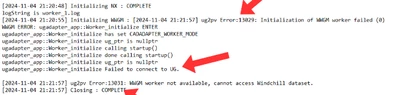
Ok. Had those 13031, 13029 errors before. They are generally because of cache separation issues (CS33759 which I addressed already) or NX isn't connect to the WGM. Check all that and it works fine.
If I launch the ugworker.bat... everything works fine. If I launch from the Worker Agent Administration window, the worker comes up but then those errors come.
I thought maybe it's a server version thing (CS245930 ). So I installed NX2312 to confirm and sure enough... same error. So no change.
I move on to the Creo setup:
Worker monitor comes on but Creo doesn't.

Ok, so maybe this is a Creo agent version thing (CS302660 , CS331638 , CS182686 ).
I tried installing, updating, modifying and forcing version 10 and 11 to exist (CS262269 ) but that didn't work. I also then went to Creo 11 (to match the Platform Services version)... and that gives me the same failure.
The rant: for the love of everything that is holy, why does this not work?? I have the same setup (version differences aside) running and running well... documented on how it's setup... this was a duplicate in terms of setup.