

avillanueva
23-Emerald I
23-Emerald I
June 5, 2024
Solved

Object Types for Initiate Workflow are limited - How to specify Part Request?

  • June 5, 2024
  • 1 reply
  • 931 views

I am creating a test workflow for a Part Request but want to use the initiate workflow option in the workflow administrator.  The problem is that Part Request is not one of the selectable types to link to the primary business object.
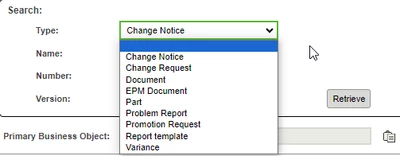
avillanueva_0-1717593959496.png

I've tried copy/paste, leaving type blank and searching by number. Is there a way to add additional types to the list?  As a backup, I considered if this is a dead end, just asking for the number and putting a lookup method in the workflow which will retrieve the part request and set it to the PBO. This is a generic problem since the list of objects above is short. There are more objects that you can run workflows against in the system. 

Best answer by joe_morton

I've used copy/paste during testing to quickly initiate a workflow on a Baseline object. That worked for me, but it's not something we want our users to have to do.


We've implemented several workflows where the subtype created has a custom lifecycle template where the first state initiates the workflow. The first task goes to whoever created the object and basically asks them to complete the task when they're ready to submit whatever it is to the next step.

1 reply

joe_morton
18-Opal
18-Opal
June 5, 2024

I've used copy/paste during testing to quickly initiate a workflow on a Baseline object. That worked for me, but it's not something we want our users to have to do.


We've implemented several workflows where the subtype created has a custom lifecycle template where the first state initiates the workflow. The first task goes to whoever created the object and basically asks them to complete the task when they're ready to submit whatever it is to the next step.

avillanueva
23-Emerald I
23-Emerald I
June 5, 2024

I may have done something wrong. Copy/Paste did end up working. Thanks.