12-Amethyst
March 20, 2025
Question

''Preview Mass Change'' step throws an error in ''Perform mass change'' wizard

  • March 20, 2025
  • 1 reply
  • 1473 views

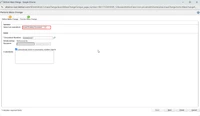
The ''Preview Mass Change'' step throws an error in ''Perform mass change'' wizard after using ''Insert Existing Document''


Please see attached files first to see steps to reproduce my concern:
Step 1.png
step 1.png
Step 2.png

step 2.png

I know how to deal with such a warning if we use ''Replace Existing Part'' for example in ''Perform Mass Change''. We can do this by manipulating the relationship constraints in type and attribute management as shown in image-1.png.
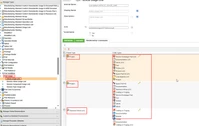
image-1.png


In Image-1.png we are manipulating a relationship between (Part to Part) not (part to document).


For this reason I could not find out if there is any other way to manipulate the relationship constraints between a part and a document. Or maybe there is any other reason for this error?


I could not find much help in PTC articles.

I really appreciate an answer for my question, as took me so much time and could not figure it out.


Thanks
BR

1 reply

Fadel
23-Emerald I
March 21, 2025

Salam Muhammad,


I just read this quickly ,No depth invetiagtion done,  anyways the relationships between part and docs are part describle and part reference link,tehre you have a relationship constraint , you may also take a look at differennt organizations, as I know that Liebherr's  PLM is very Organization oriented      : 


Fadel_0-1742578160572.png


Br,

Fadel/فاضل

Buiꓘa
12-Amethyst
March 24, 2025

Hi Fadel,


Thank you for your reply and clarification. 

I tried to manipulate both ''part describle link'' and ''part reference link'' on site level and on Org level but unfortunately it did not help.

This sounds strange for me now.. 

Best Regards

Muhammad

Fadel
23-Emerald I
March 24, 2025

Would you add the stacktarce form the logs ,will take a look later on and try to get to root cause .

Buiꓘa