1-Visitor
February 29, 2016
Solved

Problem Report Task Messages

  • February 29, 2016
  • 5 replies
  • 2825 views

Hello,

How can I change text message  "You have been assigned a.... ".  I need related java file.

This message is sent when a problem report is assigned to someone.
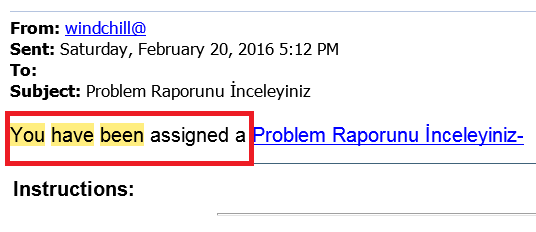
Adsız.png

Best answer by PASI-Consulting

Hi

This message is not in a java file I think, It's in the html templates files inside codebase. look for a folder called templates or htmltemplates ...

Regards,

5 replies

1-Visitor
March 8, 2016

Hi

This message is not in a java file I think, It's in the html templates files inside codebase. look for a folder called templates or htmltemplates ...

Regards,

MarcoTosin
21-Topaz I
March 8, 2016

I think your request isn't about Creo, but about Windchill.

If you think I'm right, I'll ask someone to move you discussion in the right section.

Marco
cdurmaz1-VisitorAuthor
1-Visitor
March 16, 2016

Yes actually it is about Windchill

MarcoTosin
21-Topaz I
March 16, 2016

OK.

Toby Metcalf‌ can you please move this discussion into the right section (I think Windchill or maybe the new Windchill Customization)?

Thanks

Marco
5-Regular Member
March 16, 2016

Thanks everyone for the head's up - this has been move to Windchill.

Best,

Toby

16-Pearl
March 16, 2016

Hi Can,


Looks like the the string is defined in <WT_HOME>\src\wt\workflow\worklist\worklistResource.java file, check for NOTIFICATION_TASK_URL String.

Regards,

Bhushan

1-Visitor
March 21, 2016

Hi there,

The Workflow Template Administration function can let you very, very easily edit the tasks (and their descriptions/mails) for an entire process in one spot.

Go to Org (or Site if you have no org-level stuff), Utilities/Workflow Template Administration, Edit the template you want to edit (if you have two copies, one at Org and one at Site, your system uses the Org one), and go into the user task for the step in question (the user task symbol on the flowchart is a pair of tiny Easter Island-like heads. No I'm not joking ). In the Activity tab of the task, the Instructions section is the exact word-for-word text that will show up on the task and the email to the user. Do you need to know how to pull variables/attributes from the change object (in your case the Problem Report) to put into the message?

Daryl
