1-Visitor
September 10, 2015
Solved

Problem with check out edit of one record (9.1)

  • September 10, 2015
  • 5 replies
  • 4665 views

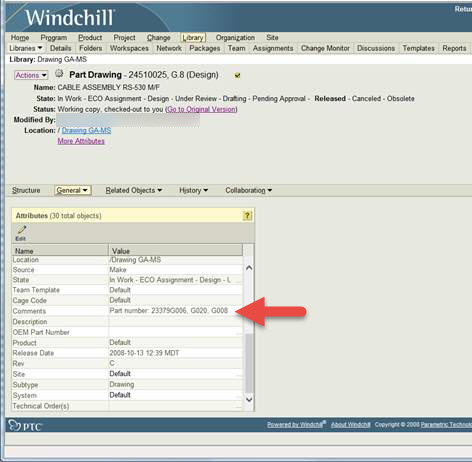
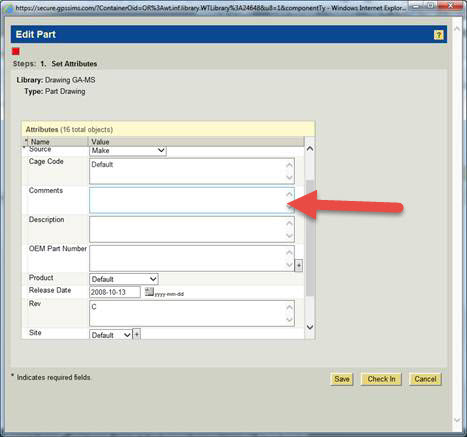
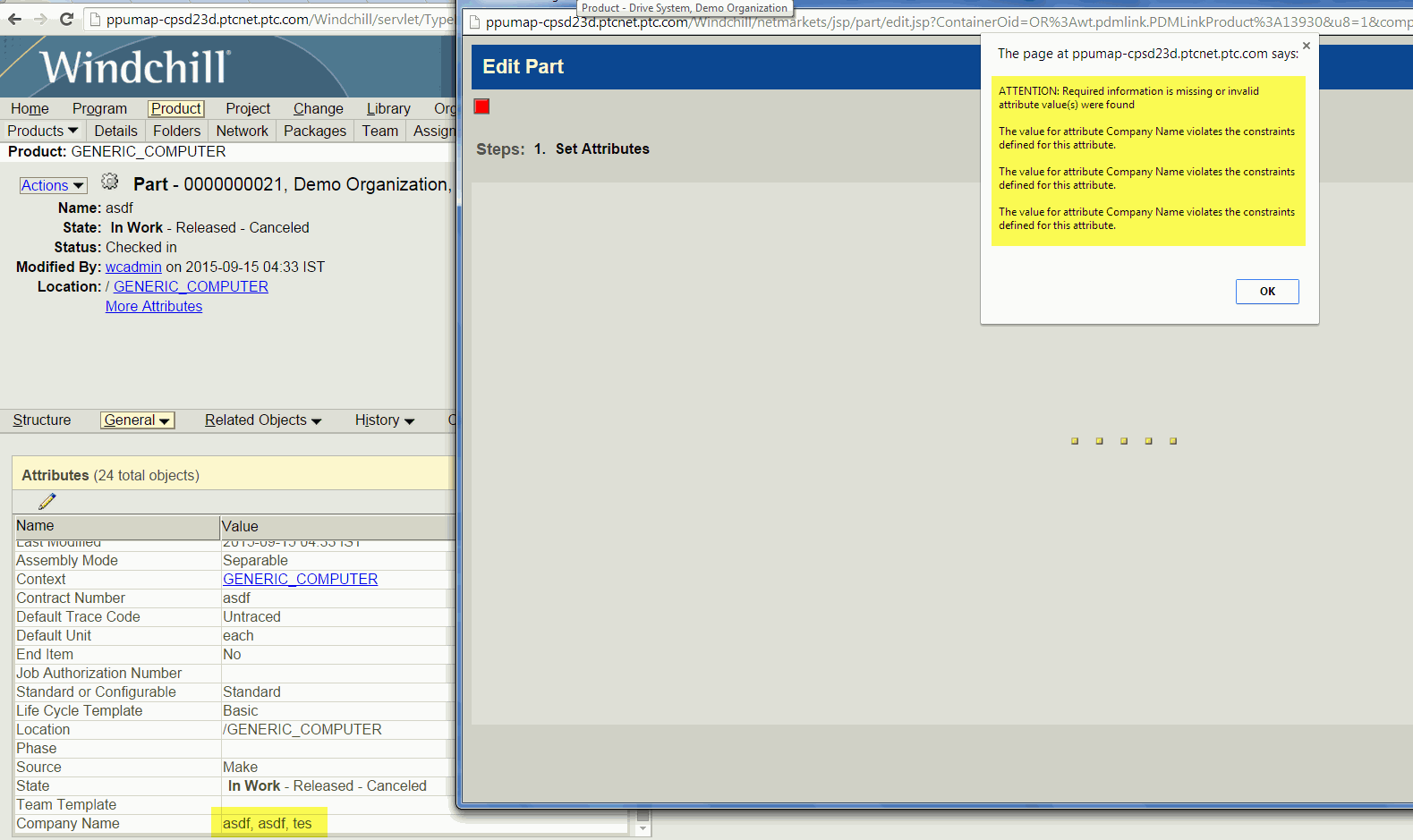
I have one record, that was migrated to Windchill 9.1 years ago.  It is just now being modified, but it gives me an error when I do check out and edit, then check in.  "The Value for attribute Comments violates constraints defined for this attribute." 

So there is a value entered in the Comments field it is "Part number: 23379G006, G008, G020", but when I do check out and edit, the Comment field appears blank.   How can fix this? 

Can I go into another area of the database of this particular record and just clear out the comment because it's having an issue with it?  We need to edit record this record.
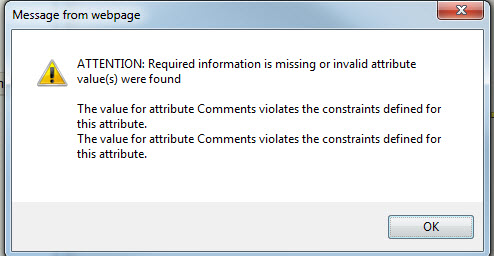
error.jpg

screenshot1.jpg

screenshot2.jpg


Best answer by BhushanNehe

I would say even the approach mentioned by Bob should be safe as there are no other dependencies on string value table. I also tried the same behavior on 9.1 M050 server. Following are my observations

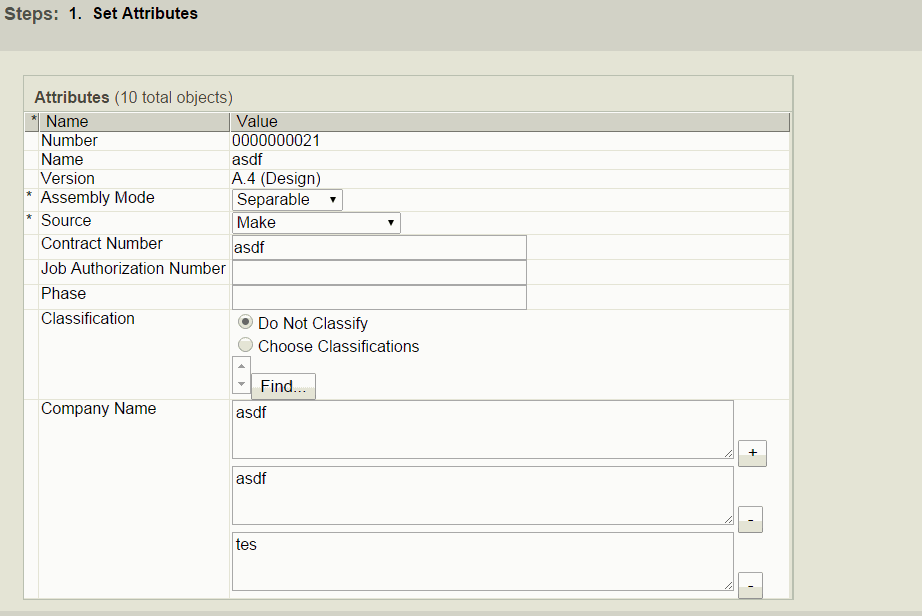
1. Created an multivalued attribute, created a part with 3 values and then added a single value constrain on the part type and tried edit options. I get the same error

14-09-2015 23-19-36.gif

2. Removed the single value constraint for a moment and tried editing the object, I can see all the values, remove all but one and I was able to check-in successfully. Re-added the constraint and the part has no issues now.

14-09-2015 23-20-43.gif

Regards,

Bhushan

5 replies

1-Visitor
September 10, 2015

It seems you have missed some required attribute value. Are you sure this error is because of the "Comments" field?

1-Visitor
September 10, 2015

The error says it's the Comments field.  I've corrected all fields.  Some attribute values are no longer available and I am trying to correct those but it's not letting me.  Other similar records are not giving me this problem when trying to update?

1-Visitor
September 10, 2015

Can you check if there is any OIR (object initialization rule) set for this attribute with RequiredValue constraint.? I guess there might be some constraint to throw an error.

You can access this page under Business Administration of Product/Library > Utilities  or Org/Site> Utilities.

1-Visitor
September 10, 2015

This is a method I wouldn't recommend as a first attempt, and if possible should be attempted in a test/dev environment first.

You can try this from the DB back-end side:

Start with these queries:

  1. select ida2a2 from wtpartmaster where wtpartnumber='24510025';  (should be one result, call it number1)
  2. select ida2a2 from wtpart where ida3masterreference='number1' and versionida2versioninfo='G' and iterationidaiterationinfo='8';  (should be one result, call it number2)
  3. select value,value2 from stringvalue where ida3a4='number2' and classnamekeya4='wt.part.WTPart' (may be multiple rows of results);

Check that the result of number 3 matches, letter for letter, the text in the field you are looking for.  There will likely be multiple results on item 3, but you want to isolate the one record for this item.

Back up the stringvalue table first (create table stringvalue_bkup as select * from stringvalue;), then delete this single record you ended up with.

You may need to refresh the Windchill page or possibly restart WC afterwards.

1-Visitor
September 10, 2015

I guess our Administrators put in a PTC ticket on this.  System Administrator thinks it's a Windchill software issue and not in the database.  But it's just with this one record.  At least it's only one I've identified from this time period when records were migrated into Windchill?  So I guess I will wait?

1-Visitor
September 10, 2015

I did a compare on another similar record that I have no problems checking in.  I notice on the problem record that there are parenthesis brackets in the Comments field.  I wonder if it's the brackets that is causing the issue?

brackets.jpg

1-Visitor
September 14, 2015

You could check that by attempting to make a new WTPart and use that exact same value for "Comments" and see if you get an error not allowing you to create it (or just use the brackets as the text).  If you do, you could use the same method I suggested, but instead of deleting the record, just modify the value field(s) to remove the [ and ] characters.

1-Visitor
September 14, 2015

I don't get any error on new parts getting created, even if I add in those brackets as text.  I cannot delete the entire record.  We just need to change the fields. 

1-Visitor
September 14, 2015

The "single value" constraint is applied to the type, which then propagates to objects as they are created.  While it is possible, it certainly isn't feasible to single out objects of a specific type to remove this constraint while others have it, without some serious DB modification.

What I would suggest is to use the steps I supplied above, and see if you an isolate the three records in the stringvalue table that construct this "entire" value.  Modify one to be the "complete value", and then delete the other two.  Thus, instead of removing the single value constraint, you actually consolidate the three values to one.

While Bhushan provides a good option, modifying the object type does NOT retroactively go back an update objects to the new type.  If you remove the constraint in the Type and Attribute manager, all objects that were created WITH that constraint will continue to have it.

16-Pearl
September 14, 2015

I would say even the approach mentioned by Bob should be safe as there are no other dependencies on string value table. I also tried the same behavior on 9.1 M050 server. Following are my observations

1. Created an multivalued attribute, created a part with 3 values and then added a single value constrain on the part type and tried edit options. I get the same error

14-09-2015 23-19-36.gif

2. Removed the single value constraint for a moment and tried editing the object, I can see all the values, remove all but one and I was able to check-in successfully. Re-added the constraint and the part has no issues now.

14-09-2015 23-20-43.gif

Regards,

Bhushan

1-Visitor
September 14, 2015

Thank you.  That worked for me and this record.