
1-Visitor
July 6, 2018
Question

Problem with GD&T Notation

  • July 6, 2018
  • 2 replies
  • 3306 views

I'm trying to fix an issue that I've run into with one of my co-worker's computers. I work in the IT department at my company, and he recently submitted a ticket showing a screenshot in windchill of a part not showing GD&T notations. BSkaggs Windchill Issue.png
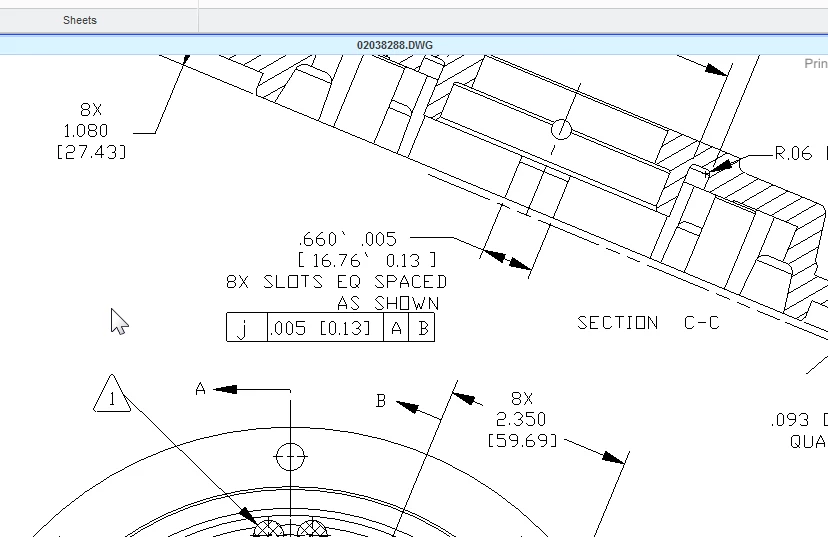
 

I tried a few different fixes, including installing and testing new fonts, but nothing seemed to fix this sheet. However, I asked him to open a different part, and the notations displayed just fine. Is there any reason that the notations are not properly displaying on just this one part? Is there any way to fix this?


Thanks in advance,

Matt

2 replies

1-Visitor
July 10, 2018

Well, as it turns out, there is one more part that for some reason isn't displaying the notations properly. Windchill Issue 2.png

With the exception of these two parts, every other part displays normally. Is there any solution, or is it just an error with the specific sheets?

23-Emerald IV
July 10, 2018

What version of Creo Parametric is being used?  Does the GD&T show up correctly on his computer?  What version of Creo Parametric is running on the Windchill CAD worker?

1-Visitor
July 10, 2018

We corrected this on our system by loading a missing GDT font on the offending machine.  However in our case, it  was an Inventor font. 


Windchill 11.0 M030 CPS09
WGM 11.0 M030
Inventor Pro 2017
Windows 10
SAP Version 7400.3.10.1126