15-Moonstone
April 29, 2026
Solved

Promotion Request Select Process

  • April 29, 2026
  • 1 reply
  • 68 views


Hi everyone,

I have created a new approval workflow and I want it to appear as an option
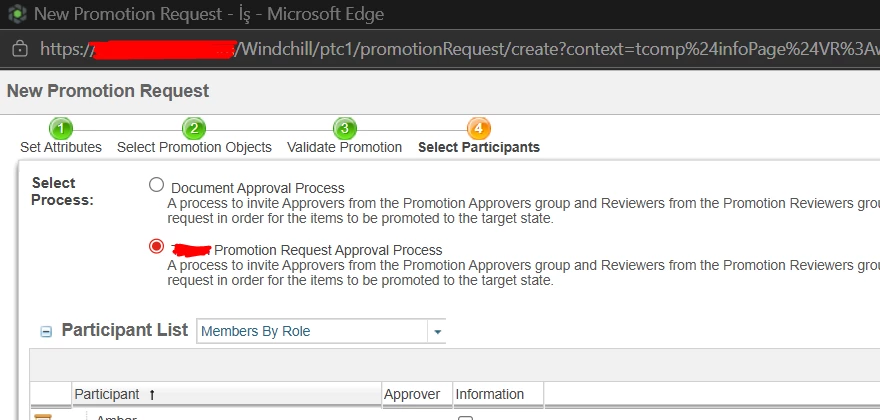
in the “Select Process” step when creating a new Promotion Request.

There are already some existing processes visible there
(e.g. Document Approval Process, custom Promotion Approval Process),
but my newly created one does not appear.


Windchill version: 12.0

Thanks in advance.


Best answer by Syed_PLM

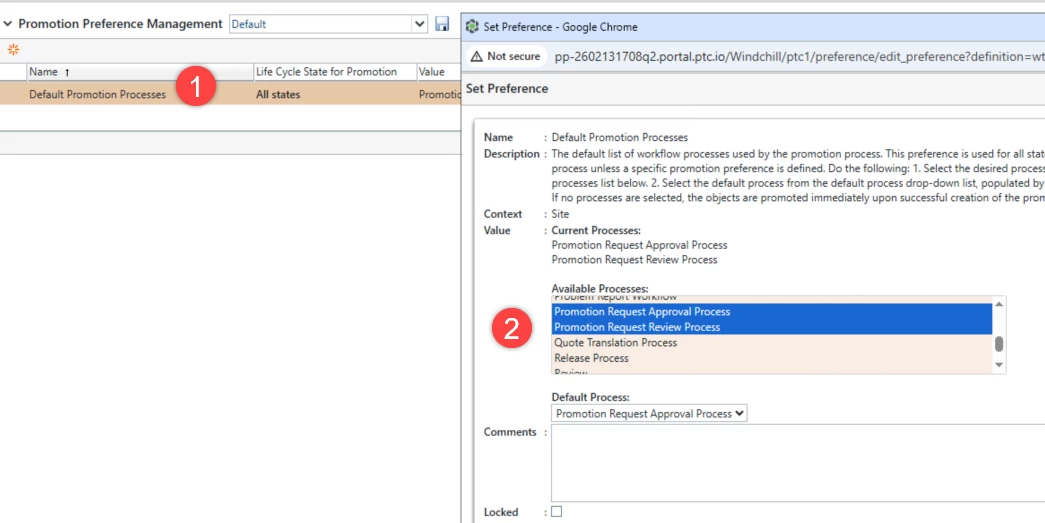
You can use the Promotion preference. Navigate to Site->Utilities > Promotion Preference Management.

Select your workflow template under the Available Processes list to appear it during the creation of promotion request process.

Hope this helps.

regards

~Syed

1 reply

Syed_PLM16-PearlAnswer
16-Pearl
April 29, 2026

You can use the Promotion preference. Navigate to Site->Utilities > Promotion Preference Management.

Select your workflow template under the Available Processes list to appear it during the creation of promotion request process.

Hope this helps.

regards

~Syed

smcvr15-MoonstoneAuthor
15-Moonstone
April 30, 2026

Hi ​@Syed_PLM ,

Thank you very much for your reply. I followed your suggestions, but the outcome remains unchanged. Is there anything else I need to do?

16-Pearl
April 30, 2026

Ensure your newly created workflow template is accessible from the context where you are attempting to create the promotion request. Set the preference accordingly at the same context level. Or you can check by having the Workflow template at the site level and see if it works.