12-Amethyst
Sep 12, 2016 6:37 PM UTC
Solved

Publishing a CREO Parametric drawing to PDF format, font changes.

Hi All,

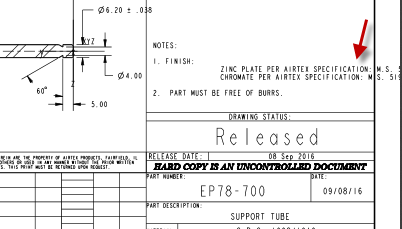
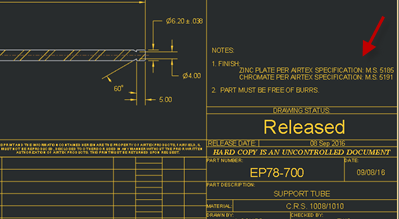
The font style is changed on PDF's after Publishing. It is shifting some of the text out of position and off the page.

CAD Document Screenshot
CAD.png

PDF Screenshot

PDF.png

I had updated the Recipe Editor settings "Font Control" to "Stroked, searchable text" or "Stroked, no searchable text" but it's not working.

dschenkenAnswer
2-Explorer
Sep 13, 2016 12:07 AM UTC

It isn't shifting the text. It is using a font where the room left for a "SPACE" is larger than the original font.

Make sure all the fonts you have in the drawing are available to the Publisher.

9 replies

20-Turquoise
Sep 12, 2016 8:33 PM UTC

I had updated the Recipe Editor settings "Font Control" to "Stroked, searchable text" or "Stroked, no searchable text" but it's not working.

You fail to mention what version of Windchill, CreoView Adapters, and Creo Parametric you are using and if this PDF is created by PostPublishing or if it is the "main" viewable. However take a look at the Creo Parametric config.pro options:

  • intf2d_out_stroke_text
  • pdf_use_pentable
  • pen_table_file
Translate
bkontham12-AmethystAuthor
12-Amethyst
Sep 13, 2016 10:31 AM UTC

Hi Jones,

I am using Windchill 10.2 M020, Creo View Adapters 3.0 M020 and Creo Parametric 3.0 M040. It's the main viewable.

Thanks,

Bhagirath

Translate
2-Explorer
Sep 14, 2016 1:11 AM UTC

Have you checked the fonts installed on the server yet? The publisher can't use or embed or stroke a font it cannot find.

Translate
dschenken2-ExplorerAnswer
2-Explorer
Sep 13, 2016 12:07 AM UTC

It isn't shifting the text. It is using a font where the room left for a "SPACE" is larger than the original font.

Make sure all the fonts you have in the drawing are available to the Publisher.

Translate
bkontham12-AmethystAuthor
12-Amethyst
Sep 21, 2016 3:29 PM UTC

Designers are using the Custom fonts which are not available on CAD Worker machine. It's working now when I copied the font to Creo default fonts directory.

Thanks much for your suggestions David.

Translate
1-Visitor
Sep 13, 2016 6:45 AM UTC

Try with below configuration in PDF export settings. Do exactly per below two images and I think you are done. You can set higher resolution for bigger drawing but it will increase file size.

Thanks,

Jitu Thakor

Translate