17-Peridot
March 14, 2024
Question

Publishing - Constraint Broke

  • March 14, 2024
  • 1 reply
  • 850 views

Hi Guys,


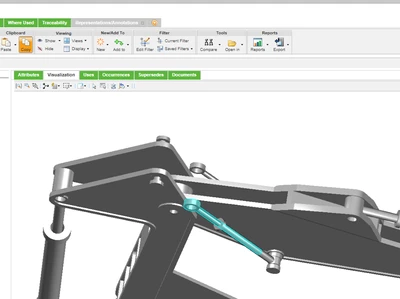
After publishing, some component constraints were broken, as shown in the below image. But if I open it in Creo or Creo View, it is properly constraint without any breaks.
 

Amirtharaj_K_0-1710419034729.png


Regards,

Aj


1 reply

avillanueva
23-Emerald I
23-Emerald I
March 14, 2024

I think the visualization tab is based on a configuration spec which might not match how it was published. You mentioned in Creo and more importantly Creo View it was correct. I would assume that publishing as-stored would look proper. The view you are looking at I think might be latest from the BOM, where the position of that component and its geometry are right but no picking up that other things have changed. Let me know if what I stated fits what you are seeing.

17-Peridot
April 16, 2024

Apologize for the delay in response @avillanueva 

I have an assembly in which I used some mechanism constraints. When I open it in Creo and Creo View, the constraints are the same as the ones I have. When I use the thumbnail viewer to see, constraint is broken.


Regards,

Aj


HelesicPetr
22-Sapphire II
22-Sapphire II
April 16, 2024

Hi @Amirtharaj_K 

A assembly feature is the case in your assembly.

You need to configure your system to show the modifications from the assembly in the structure


set the Visualization > Dynamic Structure Preferences to Yes

https://www.ptc.com/en/support/article/CS263734?


PetrH.
