

12-Amethyst
March 13, 2025
Solved

Pull all drawings from server side workplace to local - sub folder cannot be searched?

  • March 13, 2025
  • 1 reply
  • 971 views

Hi, 


in Windchill, we have several workspaces. Each workspace has some sub folders. 


In the table view, if I want to search "*.drw". I can only see drawings inside my current folder. But nothing from the sub folders. 


Did we setup something wrong? 


Thanks
 

Best answer by SC_TK

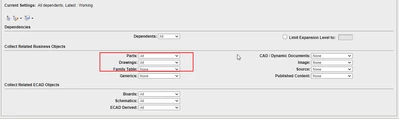
All right a solution was found. But not as straightforward as I would expected. To get all the drawings. first I selected the General assembly which contained all the models. Then I added this General assembly into my workspace. In the next page, I selected to include all drawings and parts.  All drawings related to the model were saved to local workspace. 

I just don't get it why Windchill cannot make the behaviour like Windows explorer. 


SC_TK_0-1742417458439.png


1 reply

15-Moonstone
March 14, 2025

Can you provide us more informations about your use-case?


A user workspace doesn't have sub-folder which is in-line with what you observe.

SC_TK12-AmethystAuthor
12-Amethyst
March 14, 2025

Thanks for replying. 


Yes, Workspace consists of both local and server side. Local workspace has no sub folder. Just a flat structure. But in common space under the project , there are sub folders on the server side for each workspace. 


I need to recreate all the PDFs for all drawings under this workspace. So I tried to pull all of them from server side to my local workspace, but I couldn't find a way to display all them in common space. 


avillanueva
23-Emerald I
23-Emerald I
March 14, 2025

Are you using a Product area or a Project?