18-Opal
November 15, 2017
Solved

question about Critical Patch set

  • November 15, 2017
  • 1 reply
  • 3659 views

Hi i'm SeonHo


i have 2 question


1. CPS 01 doesn't work

It is a question.
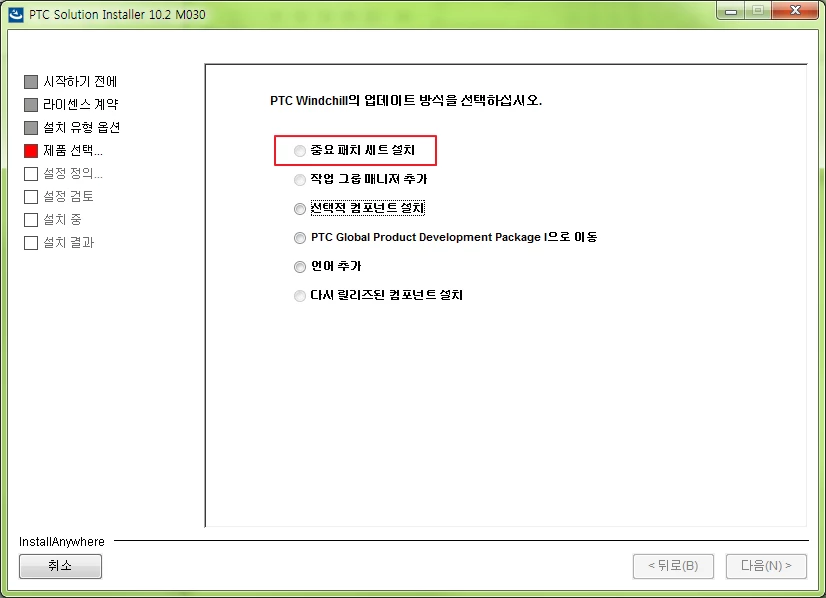
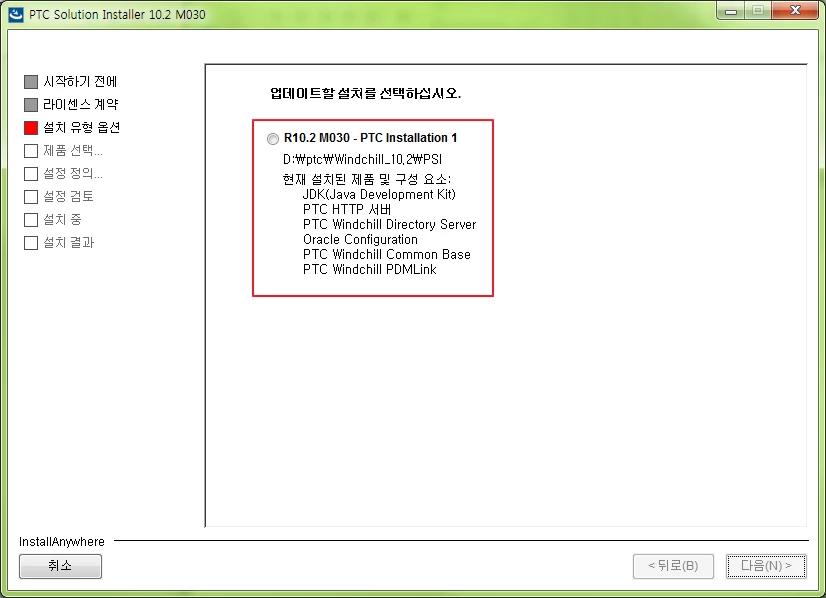
If you select the product to update and then proceed to the next step, the CPS button is disabled.chose windchill that installedchose windchill that installed
critical patch set install button disablecritical patch set install button disable
But the CPS 25 has the button activated.
What is the problem?
Is the Workgroup Manager component not installed?


2. CPS have Component?

There are two to four components within a CPS.
For example, CPS06 includes service packs, Workgroup Manager, and Third Party Software.
So, if you update to CPS 06, does that mean that a separate Workgroup Manager is installed without additional installation?
In the past, when I installed PDMLink, I selected Workgroup Manager and installed it. In this case, only PDMLink is installed.
If so, should the workgroup manager be pre-installed for the update?
Or do you mean that without the Workgroup Manager you will be installing via an update?


Thank you.


Best answer by Invisigoth

Hello,


This article may help: Article - CS134275
FAQ : Critical Patch Sets (CPS) for PTC Windchill

There are several FAQs there regarding 10.2 M030 and WGMs. For example this one seems to be what you are asking about:


"I want to update my server with Windchill CPS. Is installation of Windchill Workgroup Manager CPS mandatory?"


Hope that is helpful,


IG


1 reply

1-Visitor
November 15, 2017

Hello,


This article may help: Article - CS134275
FAQ : Critical Patch Sets (CPS) for PTC Windchill

There are several FAQs there regarding 10.2 M030 and WGMs. For example this one seems to be what you are asking about:


"I want to update my server with Windchill CPS. Is installation of Windchill Workgroup Manager CPS mandatory?"


Hope that is helpful,


IG


CHASEONHO18-OpalAuthor
18-Opal
November 16, 2017

Thank you


i tried update CPS 25

but PSI include CPS 25 version show CPS 7

and then they request M030-CPS06,07

after update windchill version said

Datecode Release Number Release Id Sequence DisplayLabel
-- -------- -------------- --------------- --------- ---------------------
M030-CPS07 10.2 pdml.10.2.30.07.04 01 PTC Windchill PDMLink 10.2
M030-CPS07 10.2 wsp.10.2.30.07.04 01 PTC Windchill 10.2 Service Pack
M031 Creo 3.0 vizpviewrun.10.2.31.00.40 03 PTC CreoView - Clients
M030 10.2 whc.10.2.30.00.39 01 PTC Windchill 10.2 Help Center
F000 Creo 4.0 vizadapters.14.0.0.00.25 02 PTC CreoView - Adapters
M030-CPS07 10.2 ie.10.2.30.07.04 01 PTC Windchill 10.2 Info*Engine
M030-CPS07 10.2 commonpdm.10.2.30.07.04 01 PTC Windchill 10.2 Common Base
M030-CPS06 10.2 wlp.10.2.30.06.01 01 PTC Windchill 10.2 MultiLanguage Pack
M030-CPS07 10.2 wgm.10.2.30.07.01 02 PTC Windchill 10.2 Workgroup Managers
M030-CPS07 10.2 wnc.10.2.30.07.04 01 PTC Windchill 10.2 Services

---------


anywhere didn't exist CPS25

is it installed properly?

14-Alexandrite
November 16, 2017
Hi SeonHo, As the Windchill version shows M030-CPS07, the PSI used to update your installation is 10.2 M030 CPS07. It should request CPS25 CD's for installation. "M030-CPS07 10.2 pdml.10.2.30.07.04 01 PTC Windchill PDMLink 10.2" Even Workgroup Manager is updated to M030-CPS07. So, please get the 10.2 M030 CPS25 installer bundle & retry the installation along with Workgroup Manager. Your Windchill Version should contain line similar to below example: M030-CPS25 10.2 pdml.10.2.30.25.07 01 PTC Windchill PDMLink 10.2 M030-CPS25 10.2 wgm.10.2.30.25.05 01 PTC Windchill 10.2 Workgroup Regards, Pankaj Product Manager, PTC