
13-Aquamarine
September 8, 2026
Question

Read the values ​​of the selected row in the Contents folder

  • September 8, 2026
  • 1 reply
  • 39 views

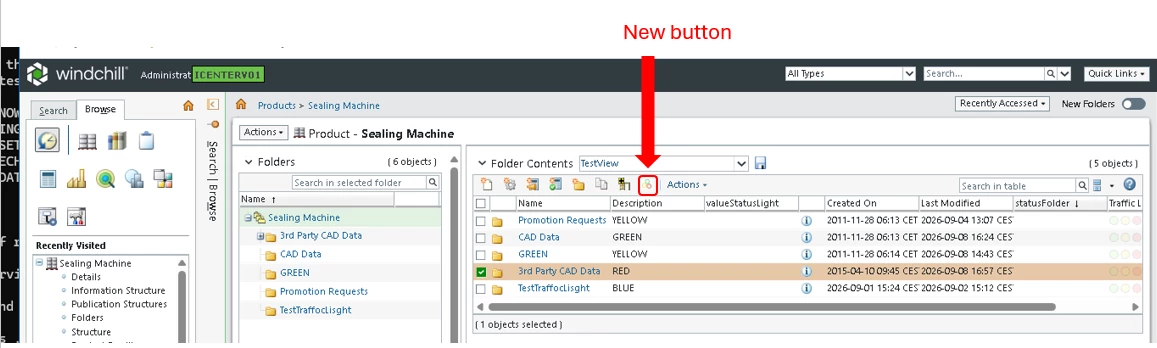
I have winfochill 13.1.4.0 rev 01 and I created a button at the button level in the Contents folder (as shown). By clicking the button, I would like to read the values ​​of the selected row. How can I do this?

BR 

Dimitri
 

1 reply

18-Opal
September 9, 2026

Hi ​@dbologna,

You need to register the Form Processor with the custom action in the custom.actions.xml file.
Use the <command> class tag to register the Form Processor by providing the fully qualified Java class path.

<objecttype name="" resourceBundle="">
<action name="">
<command class="test.TestFormProcessor" method="execute"/>
</action>
</objecttype>

In the Form Processor, use the logic provided below. 
You can access the selected objects info using the object variable.

package test;

import java.util.List;

import com.ptc.core.components.beans.ObjectBean;
import com.ptc.core.components.forms.DefaultObjectFormProcessor;
import com.ptc.core.components.forms.FormResult;
import com.ptc.netmarkets.model.NmOid;
import com.ptc.netmarkets.util.beans.NmCommandBean;

import wt.fc.ObjectIdentifier;
import wt.fc.PersistenceHelper;
import wt.fc.WTObject;
import wt.util.WTException;

public class TestFormProcessor extends DefaultObjectFormProcessor {

@Override
public FormResult doOperation(NmCommandBean commandBean, List<ObjectBean> objectBean) throws WTException {
FormResult formResult = super.doOperation(commandBean, objectBean);
List<NmOid> list = commandBean.getActionOidsWithoutWizard();
try {
for (NmOid oid : list) {
ObjectIdentifier identity = oid.getOidObject();
WTObject object = (WTObject) PersistenceHelper.manager.refresh(identity);
}
} catch (Exception e) {
}
return formResult;
}
}