
5-Regular Member
September 2, 2026
Solved

Replace command greyed out in a part instance structure tree

Hi,

I’m trying to make the “Replace” button active in a structure of a Part alternate:
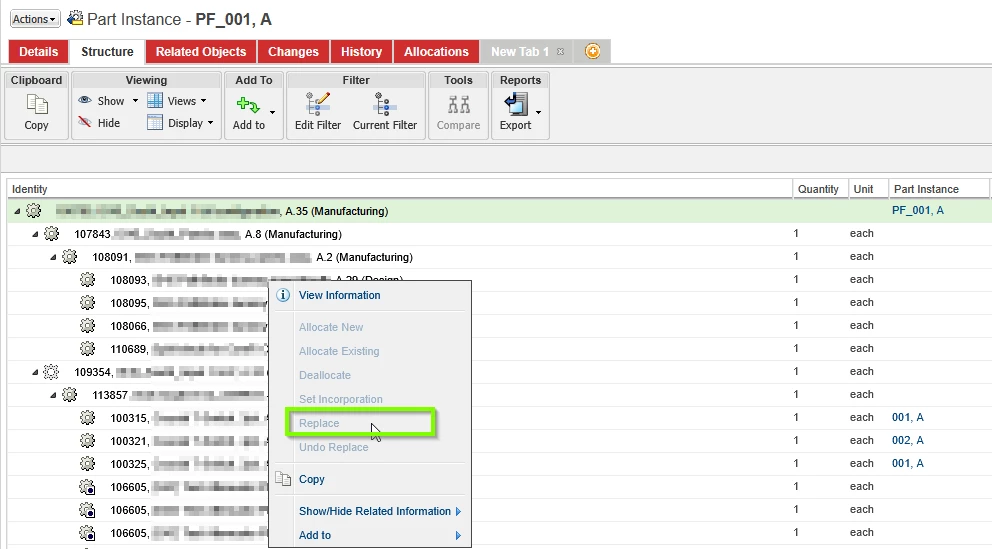
I can’t understand why it is not active. Looking at the following documentation https://support.ptc.com/help/windchill/r13.1.2.0/en/index.html#page/Windchill_Help_Center/configsandinstances/CIInstanceReplacePartWithin.html I don’t see what is justifying this behavior. I already have an Alternate for the Part I want to replace.

Any ideas?

Cheers,

Yoan.

5-Regular Member
September 3, 2026

Hi, 

Thanks for your reply.

The left click is actually coming from one of the child, sorry I should have been more precise about it.

But in the end I think I managed to find a way. For some reason the test I did, by adding an alternate to the the part I want to replace worked.

3 replies

5-Regular Member
September 2, 2026

Version of Windchill used is the 12.0

Translate
17-Peridot
September 2, 2026

Looks to me that you are trying to replace the top level of the structure. To me It doesn't make sense to replace something at that level. If you were to replace something it would be at a child level. 


Translate
YP_145979025-Regular MemberAuthorAnswer
5-Regular Member
September 3, 2026

Hi, 

Thanks for your reply.

The left click is actually coming from one of the child, sorry I should have been more precise about it.

But in the end I think I managed to find a way. For some reason the test I did, by adding an alternate to the the part I want to replace worked.

Translate