17-Peridot
February 21, 2024
Solved

Report Template

  • February 21, 2024
  • 2 replies
  • 1808 views

Hi Guys,

      I am following the steps like in the link below, but I am not sure how to work on point 12.

 
12. Use the Criteria tab to specify any additional criteria that should automatically be applied. For more information, see Query Builder Criteria.
The Sort tab does not affect how the search results are sorted.


https://support.ptc.com/help/windchill/plus/r12.0.2.0/en/index.html#page/Windchill_Help_Center/LclSrchAdvancedSearchExampleReportTemplate.html

Regards,

Aj

Best answer by HelesicPetr

Hi @Amirtharaj_K 

In the query builder you have to check that the report can be used in the advanced search 

HelesicPetr_1-1708613587679.png


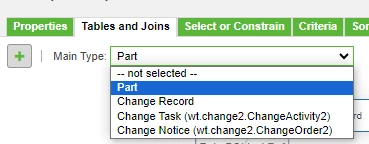
and also you need to specify what type of object the report can be used in the table and joins

HelesicPetr_0-1708613550364.png


PetrH

2 replies

Fadel
23-Emerald I
February 21, 2024

In the below example first I have created a report to show parts , in the second part I have used constraint tab sub select

on table WTUser to have only parts created by wcadmin


I hope this answers your question


Buiꓘa
HelesicPetr
22-Sapphire II
22-Sapphire II
February 21, 2024

Hi @Amirtharaj_K 

The paragraph 12 says that you can set additional criteria internally in the Report template on the Criteria tab in the query builder editor and users can not change that criteria.

Also the last sentence of the paragraph 12 says that the Sort tab in the queribulder editor does not take effect in the advanced search result table. 


Is it more clear?

PetrH

17-Peridot
February 22, 2024

Thanks for the reply @Fadel @HelesicPetr

@HelesicPetr Thanks for the more details.

@Fadel  can we use this report template in Advanced Search,

 Regards,

Aj

Marco Tosin
21-Topaz I
21-Topaz I
February 22, 2024