Hi jmccormick-4,
I had done similar kind of testing long back. I am sharing steps for your reference. I hope it will help you.
- Create two String variables at the “Process level” namely: Context and Folder with blank default value
- Use a Expression robot to initialize these variables.
- Suppose you are running a workflow on the WTPart (which is in this case your PBO). The expression robot will contain a code something like the one below:
- System.out.println("\n\n\t\t******I'm Going In*****************");
String pbo=primaryBusinessObject.toString();
- wt.fc.ObjectIdentifier oid =wt.fc.ObjectIdentifier.newObjectIdentifier(pbo);
- wt.part.WTPart part=(wt.part.WTPart) wt.fc.PersistenceHelper.manager.refresh(oid);
//get the Context
Context = part.getContainerName();
//get the Folder
Folder = part. getFolderPath();
- System.out.println("\n\n\t\t Context is ->"+ Context +"\n\t\t Folder is ->"+ Folder);
- Now, define the Application Robot which will look like the one below:
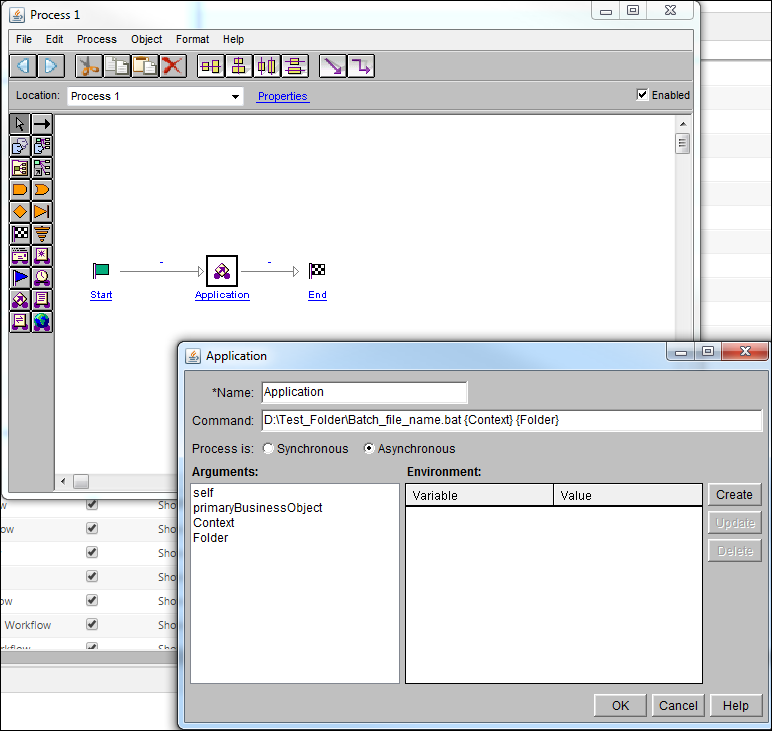
- Create a sample batch file at D:\Test_Folder\Batch_file_Name.bat
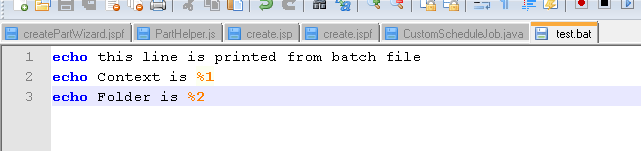
- The batch file should listen for the arguments passed using “%argumentnumber” (for example %1, %2, and so on) sign as shown below: (Passing arguments to Batch files concept)
Thanks,
Shirish

