

21-Topaz I
July 13, 2020
Question

Select-able report for CN types

  • July 13, 2020
  • 3 replies
  • 10246 views

We have several sub-type Change Notices


I created a report that shows me all the currently open CN's but using the top-level Change Notices. This report shows who the current assignee is and when it was assigned to them.


I have a request from one of my users that asked if all the CN sub-types ("ECN Type" shown below) could be shown in the criteria page when creating the report and have it so the user can select which CN's to report on.
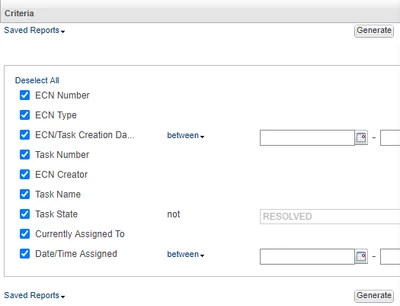
STEVEG_0-1594668821594.png


I looked at it but couldn't figure out how to make that happen. Does anyone know how to do that?

3 replies

14-Alexandrite
July 13, 2020

In 10.2 there was a way to do this in the arguments of the select tab. See here: https://support.ptc.com/cs/help/windchill_hc/wc102_hc/

I haven't tried this yet on 11.1. But I imagine it might be similar to the conversion of showing the Branch Identifier to display the Information Page icon.

aaronjlarson_0-1594730773871.png


14-Alexandrite
July 14, 2020

Found it.  It works the same, but this option isn't listed in the 11.1 help anywhere that I can find.  But if you follow the concept from the 10.2 help, regarding the "Type Definition Reference.Key.Branch ID" and the method for showing the information page icon in the 11.1 help it works.  See images.  

aaronjlarson_0-1594731445810.png


aaronjlarson_0-1594731359594.png


STEVEG21-Topaz IAuthor
21-Topaz I
July 14, 2020

Unfortunately, we are not using WTParts so that is not available for me.

STEVEG21-Topaz IAuthor
21-Topaz I
July 15, 2020

It looks like I cannot do this since we don't use WTParts and that is where the "Type Definition Reference.Key.Branch ID" is?  But I can't even add WTParts to the Tables page.

No_wtpart.jpg


Thank you for trying to help.

14-Alexandrite
July 15, 2020

The WTpart is listed as just "Part" in the tables menu.  If you're trying to do this for change notices  you should have this table in your query design:

aaronjlarson_0-1594838689047.png


Add the reportable item "Type Definition Reference.Key.Branch ID" to the Select tab from this table object.

aaronjlarson_0-1594838915413.png


STEVEG21-Topaz IAuthor
21-Topaz I
July 15, 2020

Maybe I should have it but I don't.

STEVEG_0-1594838987959.png


STEVEG_1-1594839180906.png