
16-Pearl
February 14, 2017
Solved

Set a default checked for Propagate Info from CR to new CN

  • February 14, 2017
  • 2 replies
  • 1989 views

OK, so I would like to same a click for every CN that Doc Control has to create from every CR.
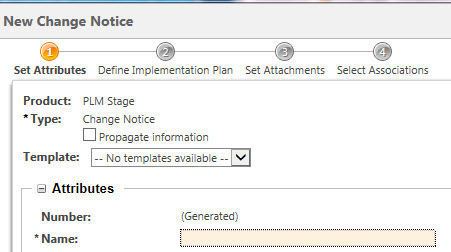
Propagate Info.jpg

Anyone know how to set Propagate Information as checked by default?
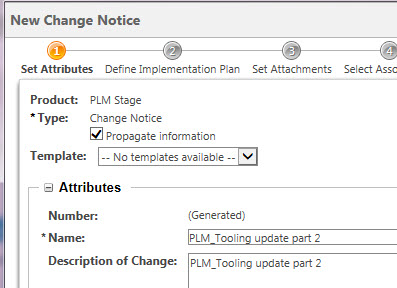
New CN.jpg

I have set the default for Change Tasks (Reviewer Required, or Obsolete).
Best answer by BineshKumar1

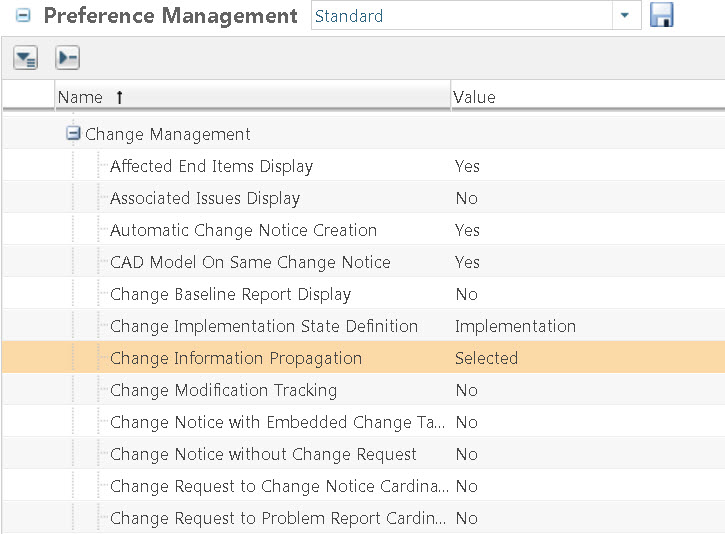
There is a preference which you can set in Change Management preferences.This will default the propagate information to yes

chsnge preference.jpg

2 replies

1-Visitor
February 15, 2017

There is a preference which you can set in Change Management preferences.This will default the propagate information to yes

chsnge preference.jpg

lgrant16-PearlAuthor
16-Pearl
February 15, 2017

Thank you Binesh.

lgrant16-PearlAuthor
16-Pearl
April 28, 2017

Now that's odd. When the CN and Task are created the default selections are populated but after the CN is created and ready to submit they all become unselected?