

Show Configurable Links in Part Structure
In the Part Structure tab, an user can select the Viewing panel --> Show --> Configurable Links, to show all of the configurable links (Revision, Describe, Reference, Master) of the Parts in the Structure.
This will improve user experience, will make it for users much easier to get insight and overview of all configurable links in a structure.
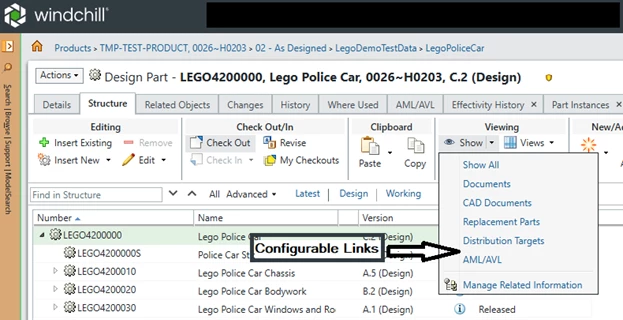
Currently it is only possible to see configurable links of a Part by selecting (every) Part in the Structure and go to (configured) ‘configurable link’ table on the right side of the Structure.
Cause Parts are continuously updated and because it is not possible to get insight, an overview on Part structure level on configurable links it is hard/cumbersome/error-prone to monitor/update the configurable links at the moment.