
1-Visitor
February 25, 2022
Question

Site Administration example for determining attributes for a part and where they are displayed.

  • February 25, 2022
  • 1 reply
  • 1687 views

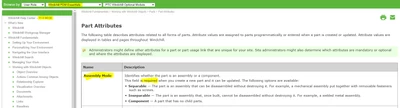
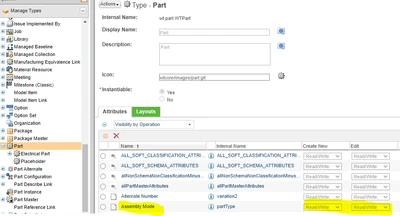
Can anyone provide an example for how the Assembly Mode attribute can be set as mandatory/optional and how to decide where the attributes are displayed in PDM Essentials?

Below is what I see in the Types and Attributes Utility that imply I should see the Assembly Mode as an attribute on a part or assembly but I do not see it.
PS_9475867_0-1645816240386.png

PS_9475867_2-1645816583863.png


1 reply

HelesicPetr
22-Sapphire II
February 28, 2022

Hello @PS_9475867 


The Layout Tab is a right place to configure where the attribute should be shown.


HelesicPetr_0-1646035845463.png


Also the Assembly Mode is always required. 


HelesicPetr_1-1646036207602.png


Best Regards

PetrH

1-Visitor
March 2, 2022

Thanks for the info confirming how to manage the attribute, but can you tell me where the user would see it?

I cannot see the attribute on recently created parts. Example below and pardon, I should have included this in the original post.

PS_9475867_0-1646236625176.png


HelesicPetr
22-Sapphire II
March 2, 2022

Hi @PS_9475867 

In the tab Layout is a menu laout where are several types places where are the attributes shown. 

Detail page, Creation wizard page, Structure page atc...


Each option has defined value in a screen type window


For EPMDocument creation wizard can be set to show your attributes in the creation wizard. (only in html creation wizard)


HelesicPetr_0-1646237888551.png


PetrH