21-Topaz I
September 21, 2015
Solved

Symbols and tables and "Other" types

  • September 21, 2015
  • 8 replies
  • 3028 views

I actually have two questions.

Currently our symbols and tables are on a shared network drive.  I am considering putting our drawing symbols and saved tables in our system.  I may be wrong but it doesn't look like I can import them directly to a workspace.  The only way I found is to add them to a drawing then save them to a workspace from the drawing.

My first question: Has anyone added these to their system?  If so do you have any points of interest?

The only problem with this is when they are saved they are set to the type "Other".  I can't find a way to search on that.  The "Other" type is not an option to search for in the Search tab on the Navigator.  I also tried to create a report but couldn't figure out what to use.  It's not even in Type and Attribute Management.

My second question: Is there a way to search on only the "Other" type in PDMLink?
Best answer by TomU

Take a look at this discussion: WTPUB:// (what are all the options)

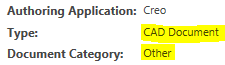
Also, saving any file from Creo to your workspace, regardless of extension, should create it as a "CAD Document".  This is the type.  On the other hand, the "Document Category" will be "other".

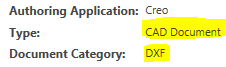
DXF

dxf.PNG

DWG / TBL (table) / SYM (symbol)

dwg.PNG

Finally, the config.pro option "allow_import_file_extension" can be used to control what file types can be directly imported to a workspace.

Additional reading:

8 replies

TomU23-Emerald IVAnswer
23-Emerald IV
September 21, 2015

Take a look at this discussion: WTPUB:// (what are all the options)

Also, saving any file from Creo to your workspace, regardless of extension, should create it as a "CAD Document".  This is the type.  On the other hand, the "Document Category" will be "other".

DXF

dxf.PNG

DWG / TBL (table) / SYM (symbol)

dwg.PNG

Finally, the config.pro option "allow_import_file_extension" can be used to control what file types can be directly imported to a workspace.

Additional reading:

23-Emerald IV
September 21, 2015

By the way, on your searching question, do an advanced search, set the type to "CAD Document", and then add "Document Category" as the second criteria.  "Other" is listed as a valid option.

search.PNG

STEVEG21-Topaz IAuthor
21-Topaz I
September 21, 2015

Fantastic! Thank you Tom.

Never even thought to look at the config.pro.

And it looks like some of our users imported a couple of other files as an Other category.

STEVEG21-Topaz IAuthor
21-Topaz I
September 21, 2015

But that option only allows one file extension at a time.  I tried separating it with a semi-colon but it only took the first one listed.  But it is easy to change so no big deal.

23-Emerald IV
September 21, 2015

Just leave the search field blank, return everything, and then either sort or filter the results.

STEVEG21-Topaz IAuthor
21-Topaz I
September 21, 2015

I am talking about importing using the allow_import_file_extension.