
15-Moonstone
August 20, 2025
Solved

Unable to Action list on WTDocument Info Page

  • August 20, 2025
  • 2 replies
  • 1546 views

Hi Team,

Need some help from the community.

Unable to see the Actions list when click on Actions for the WTDocument in Infopage.

When select the WTDocument in folders page and click on Actions it does show all the list.

Any idea wht could be the probable causes.
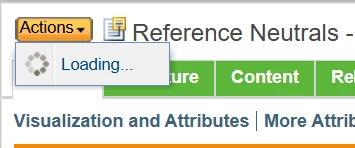
 

DKWc_0-1755677937085.png

Thanks in advance.


Best answer by DKWc

Hi Thanks for reply.

Digging further found the cause.

There was a issue with one of the tag in customactions.xml

After fixing this things are working fine.

2 replies

Fadel
23-Emerald I
August 20, 2025

Do you see anu erros in the logs ?

Buiꓘa
DKWc15-MoonstoneAuthor
15-Moonstone
August 20, 2025

Nopes

Fadel
23-Emerald I
August 20, 2025

Enable client customization and reload action : 

1- Site > Utilities> Preference Management> Client customization : 

Fadel_0-1755682145974.png


2- client customization > tools > reload actions : 

Fadel_1-1755682211747.png

Fadel_2-1755682275362.png


Buiꓘa
avillanueva
23-Emerald I
23-Emerald I
August 20, 2025

Is it just the actions drop down on WTDocuments page? What if you select actions on a different object or that same object say in a folder browser or search results via right click? Does it appear there? WAG but since some of this might be javascript dependent, you might try clearing browser cache, especially if this is one user on one machine. Does this appear for other users with same access rights? 

Lastly, are there any customized actions or actions filters added? One of those might be misbehaving. 

DKWc15-MoonstoneAuthor
15-Moonstone
August 21, 2025

Hi thanks for reply.

This is working for fine for all other objects.

Its failing only for WTDocument.

Strange thing is there are no logs generated in MS.

Tried replacing the customaction-models.xml from working server still the issue persists.

avillanueva
23-Emerald I
23-Emerald I
August 21, 2025

So you do have custom actions for WTDocuments menu? Could one of them be misbehaving or caught in a loop?  For any of those customizations, filters, etc, turn on DEBUG logging to see what its doing. Or you coudl try removing them one by one to see which one is at fault.