
13-Aquamarine
March 29, 2022
Question

Unable to create EPM Document

  • March 29, 2022
  • 1 reply
  • 1417 views

Dear all,


After installation of Windchill 12.0.2.0, I am getting the below error while creating the CAD document.

I have tried creating the cad document from the wt part & in the Workspace, In both the cases i am getting errors as below.

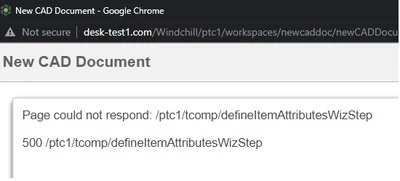
Vipul_2-1648536754787.png


Vipul_1-1648536543070.png


And one more thing

as i go to Utilities--> Types & Attribute Management--- the subtypes below EPM DOCUMENT are not loaded. then i have tried to load the base & load data once again but still the error remains.

How to load the Soft types?
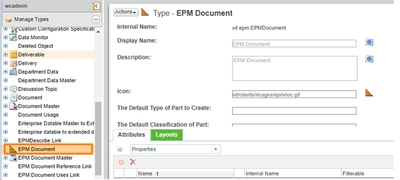
Vipul_3-1648537198064.png

As you can see in above document there is no dropdown for the EPM Document ?


Please provide the solution.

Thanks in Advance.


1 reply

17-Peridot
March 29, 2022

Is this a new OOTB Windchill or have you upgraded it and also changed the domain name?

I saw this behaviour if the internal domain has changed. This works for everything except CAD-Documents. Until 11.1 there was a hidden utility to change also the domain for CAD Documents but this has been removed.

Perhaps this helps: https://www.ptc.com/en/support/article/cs115451


Vipul13-AquamarineAuthor
13-Aquamarine
March 29, 2022

This is new installation of windchill 12.0.2.0 using 11.2 ldap so i assume that there is no problem due to change of  internet domain. Please can you suggest any other solution.


Thanks for reply

17-Peridot
March 30, 2022

Is there no error message in any log file if you open the type and attribute manager? Or check the CAD templates on the site. With which type were these created?