6-Contributor
January 27, 2025
Solved

Unable to Create New Product in windchill pdmlink 13.0.1.0

  • January 27, 2025
  • 1 reply
  • 1084 views

Hello Everyone,


I am currently using Windchill 13.0 and trying to create a new product and Library.


When I navigate to Recent Products -> View All, I don't see a "New Product" button, only an "Add to Favorites" option is available.


I've tried this with my administrator account. with no success. when login with as user account that I've added to the Product Creator group, it is working...


Can anyone help me with this issue? Any guidance would be greatly appreciated.


also tried with to change to Premium License and below Steps


1) Login to Windchill as Administrator > Organization > Select Organization> Creator> Above Tab Select Product Creators> Add user.


Thank you!

Best answer by HelesicPetr

Hi @SW_369 

You didn't mention if the Organization is assigned to the user.  

HelesicPetr_3-1738046563565.png


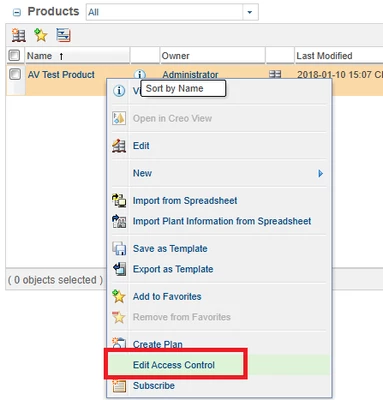
Check the user ACL rules by the Edit Access Control

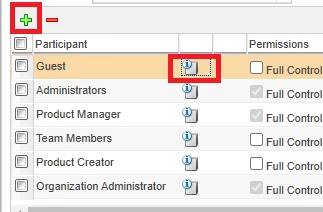
Add the user to the table and check all ACLs...

HelesicPetr_1-1738046350605.png

HelesicPetr_2-1738046406480.png


Also show a debug mode by adding a parameter in an address ?jcaDebug=1


Windchill/app/#ptc1/comp/netmarkets.product.list?jcaDebug=1

HelesicPetr_0-1738046297218.png

Check the action menu and say what validator disable the action.


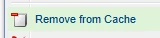
Also remove from cache can help on the specific user. 

HelesicPetr_5-1738046699447.png


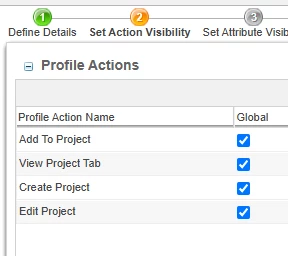
Also check if the user is assigned to any profile that allow him to se the Create project button

if he is not part of any profile that shows the action create own profile and assign him to it.

HelesicPetr_9-1738047013745.png

It can be the case.


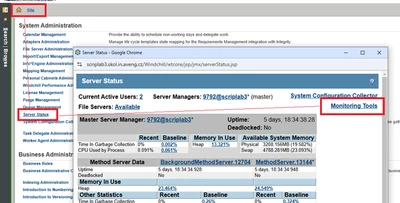
If you need to se the logs then go to the log file viewer

CS370530 - Log File Viewer in Windchill PLM


1. Go to the Site 

2. Open a Server Status

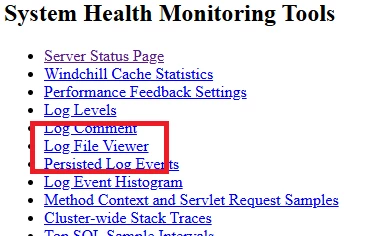
3. Open Monitoring Tools

4. Open Log File Viewer

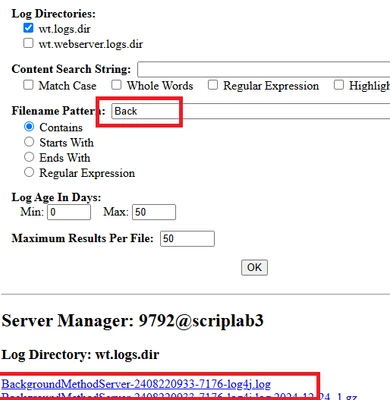
5. Select wt.log dir check box

6. Search the log files (the file name pattern is case sensitive)

in your case it is MethodServer log not the BG one. 

HelesicPetr_6-1738046854960.png


HelesicPetr_7-1738046855153.png


HelesicPetr_8-1738046855324.png

PetrH


1 reply

HelesicPetr
22-Sapphire II
22-Sapphire II
January 27, 2025

Hello @SW_369 

The user has to be assigned to an Organization

The user has to have an email 

The user has to be added to the Admin group.


Check all this points and if some of them are not true then you could solve the issue. 


PetrH

16-Pearl
January 27, 2025

@HelesicPetr is right.  I Ran across the Organization issue last month.  Was using a generic "orgadmin" account defined in the corporate LDAP, mapped in a JNDI Adapter where the organization wasn't specified.  So orgadmin came thru as a Site level account and couldn't create contexts, regardless of manually assigned permissions, group/role membership, personal cabinets domain, etc.