

23-Emerald IV
September 14, 2023
Question

Unable to Open Creo View when Windchill is using HTTPS

  • September 14, 2023
  • 5 replies
  • 7220 views

I'm running into an issue with Creo View when Windchill is configured to use HTTPS.  Attempting to open anything from Windchill in Creo View throws this error:
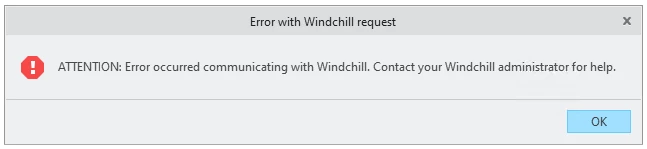
TomU_0-1694699648596.png

  • Following the steps in CS242260 to create an environment variable (PVIEW_SEARCH_ALL_CERTIFICATES=1) has no effect.
  • Following the steps in CS312299 to alter Edge internet properties to not check for certificate revocation will allow the Creo View login dialog to appear, but as soon as credentials are entered the dialog closes and Creo View never appears.  (Webserver logs do show successful authentication.)
  • The location of the users TEMP directory is not the issue. (CS347988 and CS378634.)
  • Firewalls are disabled and no anti-virus software is currently in use.
  • These are commercially purchased certificates, and the full chain is valid and not expired.
  • Creo Parametric works just fine.  It's only Creo View that is having problems.
  • This is not a cluster and there is not a proxy server.

Is there anything special that needs to be done on the client computers to fix this issue, or should simply installing the certificates on the Windchill server (Apache and Java) be sufficient?  The error is reproducible on both the server and on the client computers, and changing versions of Creo View has no effect.

5 replies

avillanueva
23-Emerald I
23-Emerald I
September 14, 2023

I did not see this listed above:

https://www.ptc.com/en/support/article/CS385890?source=search

Basic authentication? Can you post your debug logs from the Creo View session?

TomU23-Emerald IVAuthor
23-Emerald IV
September 14, 2023

Not using single sign on.

16-Pearl
September 14, 2023

What version of Windchill you are using? Note that starting 12.1, Windchill uses TLS1.3/SSL3 which needs to be enabled in the config files.


regards

~Syed

TomU23-Emerald IVAuthor
23-Emerald IV
September 14, 2023

@shussaini,

This is 12.1.2.4.  According to the documentation, TLS 1.3 is enabled by default.  Are you saying Creo View 10 does not support TLS 1.3 by default?


TLS 1.3 Support for Windchill (ptc.com)


https://www.ptc.com/en/support/article/CS355457


TomU23-Emerald IVAuthor
23-Emerald IV
September 14, 2023

Enabling TLS 1.2 (only) did not make any difference.

TomU_0-1694716807465.png

-----------------------------------------------------------

Enabling TLS 1.2
Option to configure TLS 1.2 manually is available. Follow the below mentioned steps for the TLS 1.2 configuration:
1.Update the mod_ssl.conf.template file located at <ApacheHome>/conf/template/ as below:
    SSLProtocol -all +TLSv1.2
    SSLProxyProtocol -all +TLSv1.2
2.Run the command from Windchill shell and <Apache_Home>:
    ant -f config.xml reconfigure
3.Restart the Apache HTTP server.
-----------------------------------------------------------
TomU23-Emerald IVAuthor
23-Emerald IV
September 14, 2023

I installed Fiddler and enabled HTTPS decoding.  Attempting to open a representation from Windchill threw this (Fiddler) error message:


TomU_1-1694718935900.png


This system is on an isolated network that does not have internet access.


The message about checking for certificate revocation seems to point back to CS312299.  I repeated the steps in that article again, and this time I noticed the comment about the second one not taking affect until restarting the computer.  (The PTC article does not mention needing to restart.)


TomU_0-1694722396397.png


After a restart Creo View will now launch successfully, but the pview.exe process(es) will not terminate after closing.  End users (who make this same change) can see objects in Creo View, but from the servers Creo View just displays a blank white page.  The mouse seems to act like there are lines present, but none of them are visible or selectable.  Just for fun I downloaded a representation and opened it locally in Creo View on the server (without Windchill) and still get the same behavior, so apparently the 'not displaying geometry' issue in Creo View is unrelated to HTTPS.  Any suggestions on that?


16-Pearl
September 15, 2023

That's frustrating. I would suggest better to open a support ticket. they can advise better based on your environment.


regards
~Syed

TomU23-Emerald IVAuthor
23-Emerald IV
September 15, 2023

I've had a ticket open all week without any real progress.  That's why I created the post here.

12-Amethyst
March 1, 2024

@TomU You are able to fix this issue, even we are facing same issue as below using 12.1.2.1.Nothing seems to be working.Please provide your inputs If you solved the same.Thank you - Srinivas

7-Bedrock
April 2, 2024

Hi guys, anyone identified a resolution to this issue if you can please share that would be great.

Thanks in advance.

Taher 

TomU23-Emerald IVAuthor
23-Emerald IV
April 2, 2024

PTC's final answer was that Creo View is not supported on Windows Servers.  The workarounds above, specifically the one unchecking the Internet Options, resolved the issue for regular users on Windows 10/11 machines, but it did not fix the issue on any of the Windows servers.  For those I still have no solution.

12-Amethyst
June 20, 2024

After 4 months of debugging, we are able to solve the issue:


Few things to consider:


In our scenario, we utilize self-signed certificates provided by our in-house IT for systems that are not internet-connected. I believe those using third-party certificates would not encounter this issue, which I will explain further.

1. Starting from the beginning, I received SSL certificates from IT and configured them in Windchill. Everything is functioning well except for an error with Creo View.

2. Upon contacting PTC, they activated logging, and the HTTP log displayed the following error:

Info 5:43:12.544 15 Mar 2024 2680 10496 internet DownloadTask HttpSendRequest failed, error: 12057 -

HTTP Error 12057 indicates an inability to validate the SSL certificate's revocation because the revocation server is unavailable. Disabling certificate revocation resolved the issue, suggesting a need for correction.

For further troubleshooting, we installed Fiddler to determine what exactly Creo View was attempting to access. We discovered that at the error step, it was trying to download a CRL file. CRL stands for Certificate Revocation List. While it could download the CRL, it failed to validate the revocation, resulting in an error.

At this juncture, I am consulting with both my internal IT and PTC to identify the issue with the CRL. PTC responded that the IT team needs to address the revocation issue, and our internal IT is uncertain about the necessary certificate changes. Further analysis by the internal IT team revealed that the Delta CRL was not properly configured, leading to the problems. Once they rectified this, Creo View began functioning correctly. As these are internally self-signed certificates, we experienced configuration issues, whereas third-party certificates should be properly configured.