

Solved
unlock a file when offline
Working offline today since they doing maintenance and I forgot to unlock an assembly and a drawing I was planning on working on. Any idea if I can unlock the drawing in my workspace when I am offline?

Working offline today since they doing maintenance and I forgot to unlock an assembly and a drawing I was planning on working on. Any idea if I can unlock the drawing in my workspace when I am offline?
I just remembered this problem from way back when we got a notification of a system outage this coming weekend. Just wanted to share my solution (coming many moons later). It's really simple and not at all intuitive.
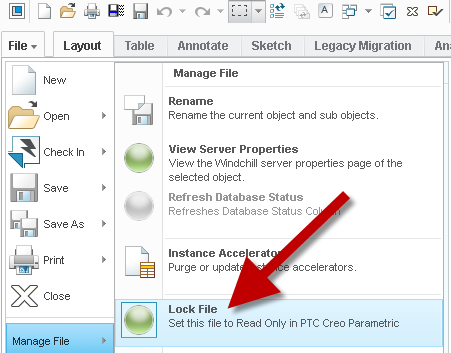
To unlock a drawing (specifically a drawing) when you don't have access to the workspace, simply go to FILE - MANAGE FILE - LOCK...hmmm, you wouldn't think choosing LOCK would do what you wanted but it's actually a toggle (lock/unlock) for locked files in the workspace. It never says unlock, but if the file is locked, it will unlock it and if the file is unlocked, it will lock it.
Enter your E-mail address. We'll send you an e-mail with instructions to reset your password.