
10-Marble
September 25, 2015
Solved

User account is not found in participant administration

  • September 25, 2015
  • 5 replies
  • 2240 views

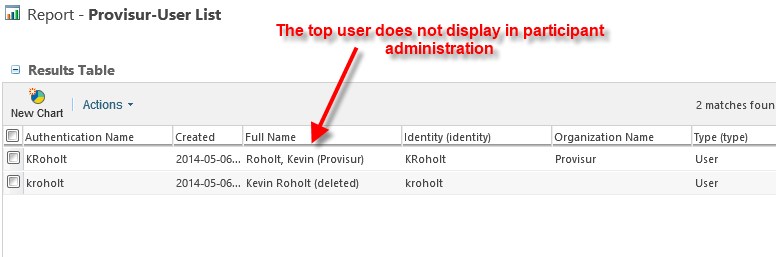
We have a temporary user who is no longer with the company.  The user is in Windchill twice.  Once as a user who is 'deleted' and the other record is still active.  When we use Windchill's participant administration the KRoholt user does not appear in the list.

When we attempt to do an advanced search in WC 10.1 and chose 'created by' in advanced search, only the kroholt (deleted) account appears in the list to select.  This is preventing us from search for CAD objects that were created by KRholot.

Other info about our setup:

  • We have LDAP setup

Any suggestions of what might be wrong or things for me to check are appreciated.
PTC-Community-UserKRoholt.png

Best answer by MichaelSchumach

After more investigation, our network administrator had removed the account from active directory.  For a test, I had the KRoholt AD account re-created.  Once that was done, the KRoholt came up in all the search list and we are now able to search for the objects this user created.

5 replies

MichaelSchumach10-MarbleAuthorAnswer
10-Marble
September 25, 2015

After more investigation, our network administrator had removed the account from active directory.  For a test, I had the KRoholt AD account re-created.  Once that was done, the KRoholt came up in all the search list and we are now able to search for the objects this user created.

23-Emerald IV
September 25, 2015

Another approach you can take is to delete the account from Active Directory and then manually recreate it in your Windchill Directory Server.  The user will show up as disconnected and you can simply remap them to the newly created Windchill DS account.

2-Explorer
September 25, 2015

The report does't look good, you have two different users with the same user id(differing in case). Since both of them did not appear in the participant's list before, I would assume they are either disconnected or disabled.

I am curious to know what the output of the report would be now?  If you can run a query like below, that would give some more information.

select u.name,

  u.idA2A2,

  u.repairNeeded,

  u.disabled,

  u.createStampA2,

  rep.lastKnownDomain,

  rid.remoteObjectId

from WTUser u,

  remoteObjectId rid,

  RemoteObjectInfo ro,

  Repository rep

where ro.remoteId = rid.idA2A2

  and ro.lastKnownId = rep.idA2A2

  and ro.idA3A3 = u.idA2A2

  and lower(name) like '%roholt%';

Thank you

Binesh Kumar

Barry Wehmiller

10-Marble
September 25, 2015

The report looks the same after adding KRoholt back into AD.  Clarification, the kroholt marked as 'deleted' did show up in our user list.  It was only the top entry that did not show.

Here is the result from running the sql query you provided.

10-Marble
September 25, 2015

Tom,

Thanks for the alternate approach.  It might be one I consider.