
10-Marble
September 29, 2022
Solved

Users are not added to organization

  • September 29, 2022
  • 2 replies
  • 2108 views

Hi!


No users are added to any of my organizations.

I have been pulling my hair out for over a month regarding this issue.


I have these three organizations. I'll only keep the first one, the other two were created while I've been testing different solutions. The first one "iei" was created during setup, and is the one I want to keep.
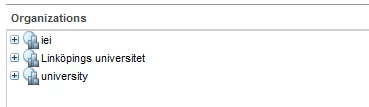
LZ_10253907_0-1664443914191.png


When adding my user as a participant, it's missing organization:
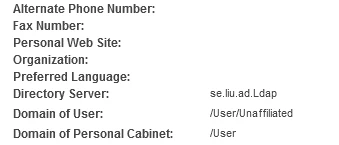
LZ_10253907_1-1664444133829.png


Other information such as phone number and email is added.


From info*engine:
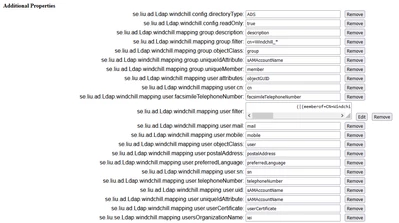
LZ_10253907_2-1664444257684.png


Can anyone see anything I'm doing wrong?

Best answer by HelesicPetr

Hi @LZ_10253907 

I've found a one difference.


address of LDAP is different then others


se.liu.se.Ldap is different from se.liu.ad.Ldap


HelesicPetr_0-1664448139710.png

PetrH


2 replies

16-Pearl
September 29, 2022

It appears the organization was NOT specified for the user at the time of creation.  This happens if user is created from the Utilities page launched from the site level. Hence, user domain shows as unaffiliated. You can edit the user and update organization field to the required one. In order have this field auto-populated, you can launch the participant admin page from the desired organization utilities page. Refer help center on updating user's organization attribute.

Hope this helps.


regards
~Syed

1-Visitor
September 29, 2022

We are having the same issue as above, so the Organization user attribute can be entered but then gets wiped clear any time the server is restarted.


Regards,

R

HelesicPetr
22-Sapphire II
22-Sapphire II
September 29, 2022

Hi @LZ_10253907 

I've found a one difference.


address of LDAP is different then others


se.liu.se.Ldap is different from se.liu.ad.Ldap


HelesicPetr_0-1664448139710.png

PetrH


10-Marble
September 29, 2022

Well, this is embarrassing.

This is exactly what was wrong.


I have rewritten that part many times too. Either I had another issue before that I have fixed since (maybe another spelling issue), or I've spelt it wrong every time.

The important thing is; it works now.

After restarting the server, and clearing the cache, all users are assigned to my desired organization.

Thank you!

HelesicPetr
22-Sapphire II
22-Sapphire II
September 29, 2022

@LZ_10253907 

No problem.

Four eyes see more than two.


It is not embarrassing. It happens to experts every day :D.  


PetrH
