Using Part Structure Override Attribute Name
Greetings,
We are installing Windchill for the first time at this company and are using: Windchill 11.0 M030 CPS08, WGM 11.0 M030, Inventor Pro 2017, Windows 10.
I am interested in using the Windchill preference Part Structure Override Attribute Name to prevent accidental Auto-Association of WTParts during Check in of new or imported assemblies.
This is an attribute that overrides another action, so YES means that you do want to override the WTPart creation action and prevent the Auto-Associate.
We are going to set the default value to be NO, and if you wanted to prevent a WTPart being created you would change it to YES.
My question is, what attribute do I put in my CAD file? Must it be named Part Structure Override Attribute Name to function properly? Or is there a way to rename it in the CAD file?
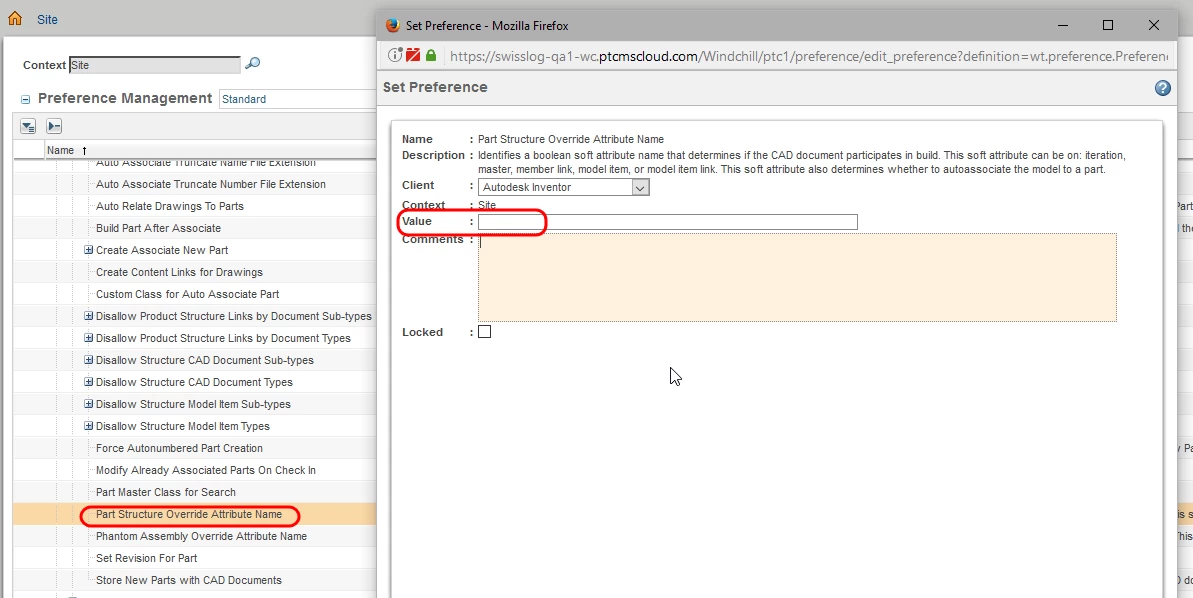
As an Admin In Windchill you go to Windchill Preference Management, navigate to Operation ▶ Auto Associate ▶ Part Structure Override Attribute Name and then right-click to Set Preference. The following window appears with a Value field. I'm thinking this is the place you put the default value (In our case NO).
I don't see a place to rename this Attribute. I'm hoping I'm missing something because we would dislike having to enter this long string in several old CAD objects (we are using Inventor).
Thanks in advance for any ideas!