9-Granite
September 13, 2023
Solved

wcadmin is no longer active

  • September 13, 2023
  • 2 replies
  • 2894 views
I am using Windchill PDMLink Release 11.2 and Datecode with CPS 11.2.1.17

After update of release to 11.2.1.17 wcadmin (Administrator) is no longer active. All other users are working right but wcadmin no. I can't publish cad document in this way

    Best answer by HelesicPetr

    Hi @FC_9723361 

    This is workaround

    Log in as a wcadmin 

    go to administrators on the site you should see this

    HelesicPetr_0-1694593494818.png

    go to the wcadmin user detail page

    HelesicPetr_1-1694593526698.png


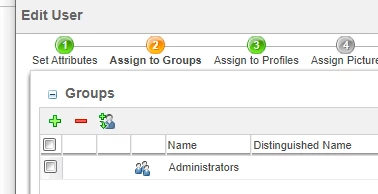
    use Actions and edit the user, 

    HelesicPetr_0-1694593708622.png


    remove them from all groups and profiles

    HelesicPetr_2-1694593554960.png


    PetrH

    2 replies

    HelesicPetr
    22-Sapphire II
    22-Sapphire II
    September 13, 2023

    Hi @FC_9723361 

    What does it mean not active? you forgot password? 

    Usually you need to add the visualization user to a license group that allows them to open models in creo by worker.

    CS348200 - Visualization License Profile


    Do you have another site admin user?

    If publishing does not work, check the visualization logs and worker logs.


    PetrH

    9-Granite
    September 13, 2023

    wcadmin not see all menu, orgadmin yes but wcadmin no.Cattura.PNG

    HelesicPetr
    22-Sapphire II
    22-Sapphire II
    September 13, 2023

    Hi @FC_9723361 

    This is problem with disabled profiles, remove the admin from all groups

    then you'll see all be fine. 

    Exclusion group usually is added to others license groups that uses disabled profiles, and the disabled profiles case this behavior.


    PetrH 

    Fadel
    23-Emerald I
    September 13, 2023

    Hi,


    what it the output of command windchill wt.auth.Authentication run in windchill shell with wcadmin credentials 

    Buiꓘa