13-Aquamarine
December 17, 2025
Solved

WGM Solidworks windchill template locations

  • December 17, 2025
  • 2 replies
  • 200 views

SW2022 SP5 -WGM 13.0.1.0 and Windchill  Release: 12.0.2.23 

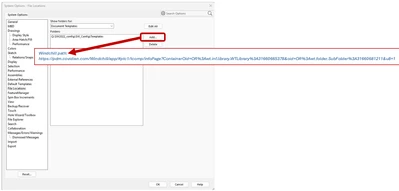
how do/can I map Windchill template folder path in Solidworks ?

Windchill path is a url path ?
rburk_0-1765994778778.png

our creo9 path is defined as:

template_solidpart wtpub://pdm.covidien.com/Libraries/CADStandards/Templates/MNav/startpart__mm.prt

thanks

Rich

Best answer by Yashraj_R

Hi @rburk you will be having a windchill file system location set on your machine, it's a virtual folder,

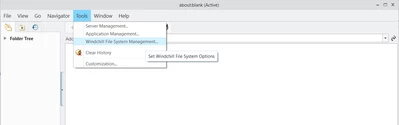
You can find it's location from Windchill Workgroup Manager> Tools > Windchill file system management

Yashraj_R_0-1766425636657.png


Browser to this Virtual folder from solidworks- PTC places/Commonspace/<your template folder>

This should set the location for the templates

Hope this helps!

2 replies

15-Moonstone
December 19, 2025

Hi,


Maybe these could help

https://www.ptc.com/en/support/article/CS116771

New CAD Document (SOLIDWORKS)


The latter is for 13.1.1.0, we're on 12.1.2.5 and I'm confident we haven't built it that way... need to study that myself!

Yashraj_R14-AlexandriteAnswer
14-Alexandrite
December 22, 2025

Hi @rburk you will be having a windchill file system location set on your machine, it's a virtual folder,

You can find it's location from Windchill Workgroup Manager> Tools > Windchill file system management

Yashraj_R_0-1766425636657.png


Browser to this Virtual folder from solidworks- PTC places/Commonspace/<your template folder>

This should set the location for the templates

Hope this helps!

rburk13-AquamarineAuthor
13-Aquamarine
December 22, 2025

 found the path, thanks 

working now