
1-Visitor
May 17, 2015
Question

When creating new WTpart, how can I setup to select my CAD start part template?

  • May 17, 2015
  • 2 replies
  • 1179 views

My company is starting the down the path of associating wtparts to the CAD docs.

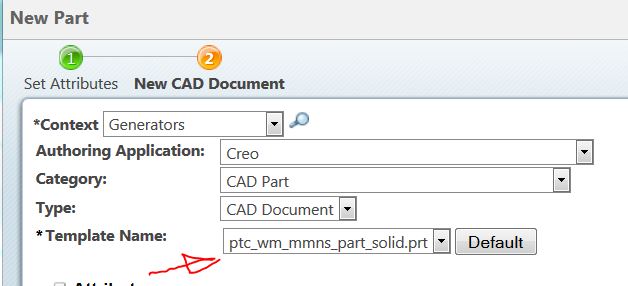
When creating a new WTpart, I have the Create CAD Document box checked below, then click Next.

Capture.JPG

Per the next screen. The OOTB ptc template appears...............where and how do I set up to my companies start part templates to be selected in this field? I have start part templates for part, assembly, sheetmetal, electrical, etc.
Capture.JPG

2 replies

1-Visitor
May 18, 2015

Your Start Parts will need to be added as Windchill Templates (suggest Org > Templates). Select CAD Document Templates from the Templates drop down, and click on New CAD document template Icon.

The problem is that this likely creates redundant templates to be managed... here in the Windchill Templates and in the directory specified by your config.pro file. I have not6 tested but in theory you should be able to map your config.pro to this location, you would just need to ensure that your Users have read access to these Templates (they probably would not with OOTB ACL - you may need to set the expose Org Preference). I've been meaning to figure this redundancy out, but have not gotten around to it so far.

1-Visitor
May 18, 2015

Keir,

Thanks for responding, I have made progress with your input, but got have another question. Per below screenshot, it wants a number, I am creating a new wtpart which is assigned a 8-digit number, then I want this CAD part file name and number to be the new assigned wtpart number.

How can I make this happen?

Also, I do not want this CAD part in the same context, I want to specify another context, is this possible?


Capture.JPG