
13-Aquamarine
June 25, 2024
Solved

Why are some attributes not searchable in Advanced Search?

  • June 25, 2024
  • 2 replies
  • 1220 views

Version: Windchill 12.0


Use Case: My Organization would like to be able to make audits for different teams. But we cannot find a smart way to filter out/find relevant Changes to do the audit. How come that some system attributes are searchable, when others are not? Can you make attributes searchable in Advanced Search? If Yes, How??


Description:

When we try to do an Advanced search on Change Notice, we have the option to set Criteria on Created By and Created On.
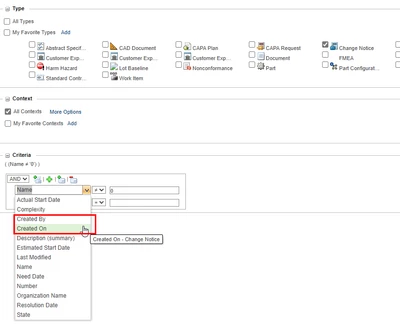
KNielsen_0-1719328141906.png

But we cannot use Team Name as a Filter, which would be very helpful in our organization.
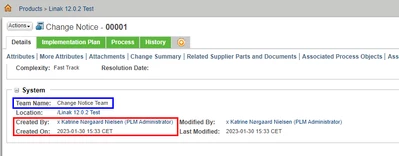
KNielsen_1-1719328178609.png

Is there some way to configure the system so it possible? 

 

Best answer by HelesicPetr

Hi @KNielsen 

Here are examples, how to add attributes to the advanced search that are not available OOTB. 

CS368732 - How to add the Markup type as a searchable object

cs180432 - How to make additional attributes available as search criteria in the "Advanced Search" UI

in the case is a markup but in your case you should use your attributes.

PetrH

2 replies

HelesicPetr
22-Sapphire II
22-Sapphire II
June 26, 2024

Hi @KNielsen 

Here are examples, how to add attributes to the advanced search that are not available OOTB. 

CS368732 - How to add the Markup type as a searchable object

cs180432 - How to make additional attributes available as search criteria in the "Advanced Search" UI

in the case is a markup but in your case you should use your attributes.

PetrH

Community Moderator
July 4, 2024

Hi @KNielsen,


I wanted to follow up with you on your post to see if your question has been answered. 
If so, please mark the appropriate reply as the Accepted Solution. 
Of course, if you have more to share on your issue, please let the Community know so that we can continue to help you. 


Thanks,
Anurag