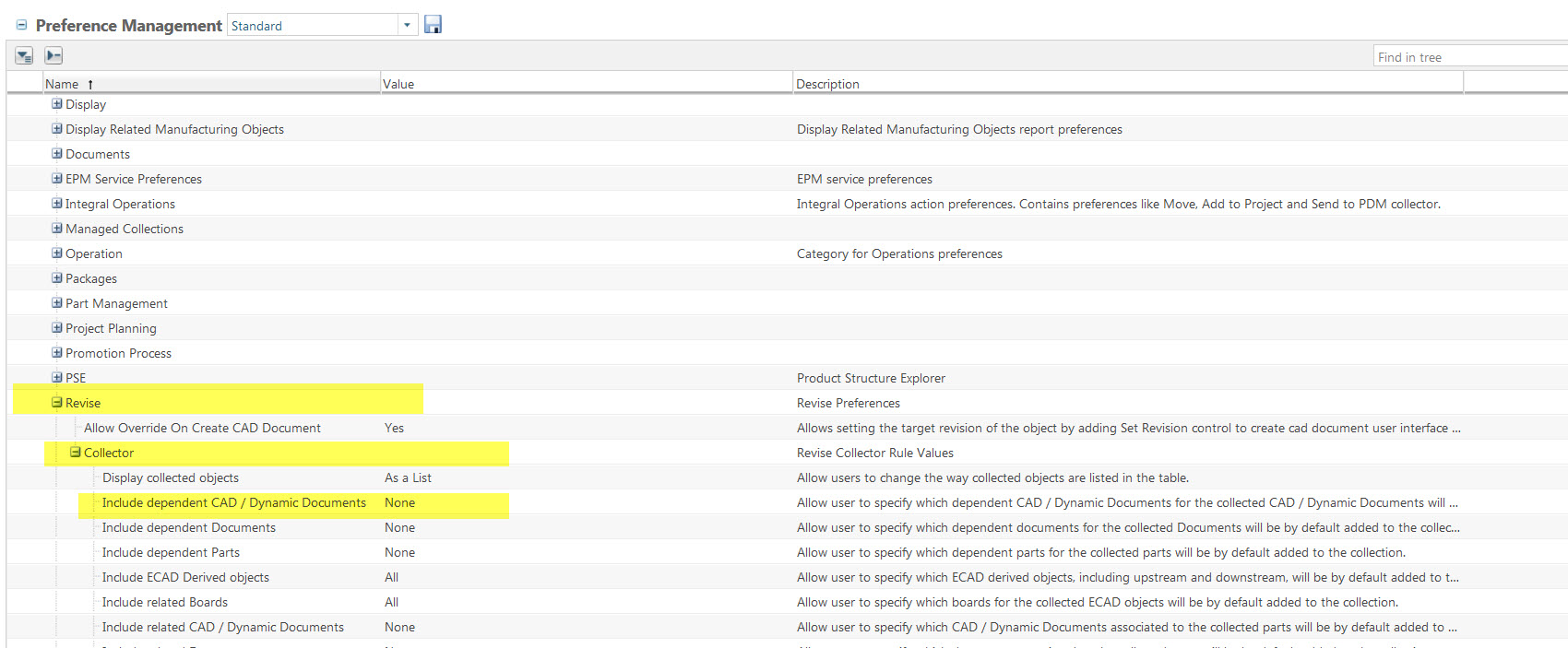
Winchill revision/state collector filtering
The company that I work for uses Windchill 10.1 as a simple check-in/check-out and revision tool without any automation. When a drawing and model file needs to be revised, it is selected from a workspace and the new revision is created there and eventually checked in. The state (in design) of the new revision is also set from the workspace at that time. My problem is that creating a new revision and setting the state of larger assembly files takes a long time because of how the collector wants to list all of the dependents under that large assembly. In addition to that, the Windchill collector default is to bump the revision or state on depenendents that we definitely do not want to change. To get around this I've started using the "search in table" tool within the collector list to display only the files that I need but I was just told that in spite of the window displaying just the files that I want to revise, behind the scenes Windchill will still bump the revision of all the dependents on the original collector list before I filtered the rest out using the search tool. I find it hard to believe that Windchill would modify objects that are not clearly displayed in the collector window. Is this really the way Windchill functions? Is there a way to set the revision/state collector to display only the files that I have explicity selected from my workspace so I don't revise files unintentionally and so it doesn't take so long for the collector to compile its list? I'd really appreciate the help.