

1-Visitor
April 21, 2016
Question

Windchill 11 MPMLink - MBOM Buy Part Visualization Issue

  • April 21, 2016
  • 2 replies
  • 4650 views

Please find the attached file for the detailed issue in the MBOM creation for the BUY Part.


Requirement: In the below EBOM structure consider that C is purchased from the Supplier, so while creating MBOM "C" will be added as an End Item (without adding the child components D & E)
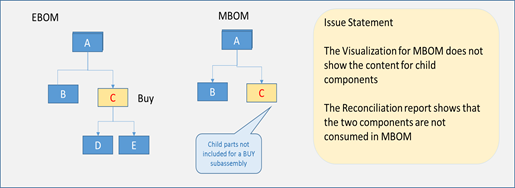
 

Issue: MBOM visualization doesn't show "C"


Any suggestions would be helpful.


Thanks in advance.

2 replies

1-Visitor
April 22, 2016

My recommendation....

Capture.PNG

GregoryPERASSO
16-Pearl
April 22, 2016

Hi

we've got exactly the same case ... And also case where C is purchased, but also built in House(so need the sub level in mBOM)

not fully agree with Ajay  (Sorry  😉  )  .  notably for option-2 .  If you do not want "track and trace" purchased part C accross manufacturing process or after sales service. You should not create a new downstream part.  cause you will need to create a mBOM alternate for part A (or use the new downstream par as BOM link Substitute or Alternate )

You can have a look also on BOM filter criteria to filter on "sourcing" attribute ... or use Phantom parts for the childs ... (we do that for mBOM clarity ) .. or use BOM Alternates to maintain both alternatives (we do that for our purchased/in House).

In our case PLM mBOM is the same as ERP mBOM ... we are then able to manage specific Docs and Process plan per BOM alternates (in House, per Plant, or per Supplier)

regards

1-Visitor
January 31, 2019

From my perspective the Reconciliation assistance is actually causing most difficulties in eBom-mBOM transformation. Some thoughts/ideas below:


Option 1 (workaround): Create a new downstream part for part C (Design view) and paste the downstream part C (Design view) into it.
When pasting upstream part C "without propagating" the children (D&E) will be included as well.
So practically you need just to create new downstream part and paste one upstream part into it.

Not the perfect solution but the best so far. It solves the problem of discrepancy status (in Reconciliation assistance).


maspb2.png

1-Visitor
January 31, 2019

Option 2 (tested -> not working): We tried also to filter-out upstream components that will cause issues (attribute based filter) but it failed. Let's assume we will use the attribute Source. The same component may be:
- delivered by an external supplier in plant X; then Source=buy
- manufactured in house in plant Y; then Source=make).

The problem is that we try to manipulate the eBOM to avoid discrepancies in Reconciliation assistance.
When implementing MPMLink, we need to adjust to the current WOW of the. It’s like open-hear surgery.
I think MAPSB could be more flexible regarding the reconciliation assistance.


 Any tips are welcome.