Windchill 13.0 Save As – Need Default “Reuse” for Library Parts Only
Version: Windchill 13.0
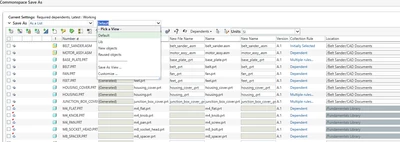
Use Case: A CAD Engineer is working on an assembly in Windchill 13.0. The assembly contains both: Standard Library Parts (e.g., screws, bearings, fasteners, etc.) stored in a controlled Library context. Design-Specific Parts that need to be copied for a new product variant. When performing Save As: The business requirement is that Library Parts must always be reused (to avoid duplication of standards). Only the design-specific parts should be copied automatically. Current challenge: Windchill sets either all dependents to Reuse (with preference “Enable Save Selected Objects Only”) or requires the user to manually adjust each dependent, which is error-prone.
Description:
In Windchill 13.0, when performing a Save As on a CAD assembly, the system does not provide an option to automatically distinguish between Library parts and non-Library parts.
With the preference “Enable Save Selected Objects Only” enabled, only the top-level assembly is copied, and all child dependents default to Reuse.
The requirement is to ensure that only Library parts are set to Reuse, while all other dependent CAD parts should default to Copy.
This leads to manual effort where users must adjust each child object in the Save As dialog, increasing the risk of errors and duplication of Library objects.
Impact: Without this functionality, standard Library objects may be unintentionally duplicated, leading to data inconsistency and confusion in product structures.