6-Contributor
September 2, 2026
Solved

Windchill Administrative Workflow – Annual Product Team Review Task for Product Managers

  • September 2, 2026
  • 6 replies
  • 99 views

Hi everyone,

I’m looking for some guidance on how to implement an administrative workflow in PTC Windchill.

We have a requirement where, once a year, we want to automatically send a task to all Product Managers in the Windchill application. The purpose of the task is to ask each Product Manager to manually review their Product Team and confirm that the team members and information are still correct.

The expected behavior is:

1. The workflow/task should be triggered once every year.

2. It should identify all users who have the Product Manager role and assign them the task.

3. Each Product Manager should receive a task asking them to review their Product Team.

4. The Product Manager should manually perform the review in Windchill.

5. Once the review is completed, they should be able to Complete the task.

6. There should be no Reject option for this task. The only available action should be to complete it.

7. If the task becomes overdue, an email notification should automatically be sent to the respective Product Manager as a reminder.

8. Ideally, the solution should be implemented using standard Windchill workflow/administrative capabilities rather than requiring extensive customization.


I would like to understand what would be the recommended approach for implementing this in Windchill.

Specifically, I’m interested in knowing:

- What is the best way to trigger this workflow once a year?

- How can I dynamically identify all Product Managers and create/assign a task to each of them?

- What is the recommended way to create a task with only a Complete action and no Reject option?

- How can I configure an automatic email notification when the task becomes overdue?

- Is this something that can be achieved using Windchill Workflow templates, timers, robots, and notifications, or would customization be required?

- If anyone has implemented a similar annual review/attestation process in Windchill, could you please share the approach or workflow design?

Any suggestions, examples, or best practices would be greatly appreciated.

Thanks in advance!
Best answer by BryanK

Hi,

Below is an example of the setup. 

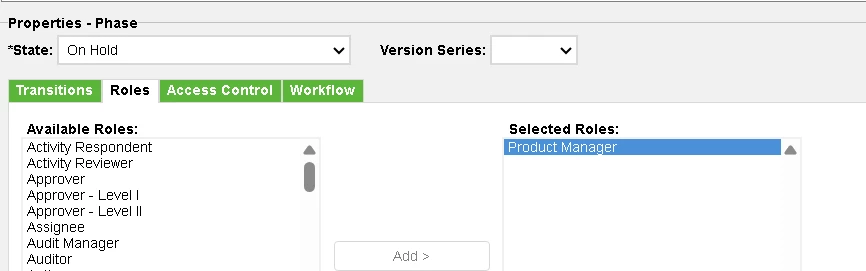
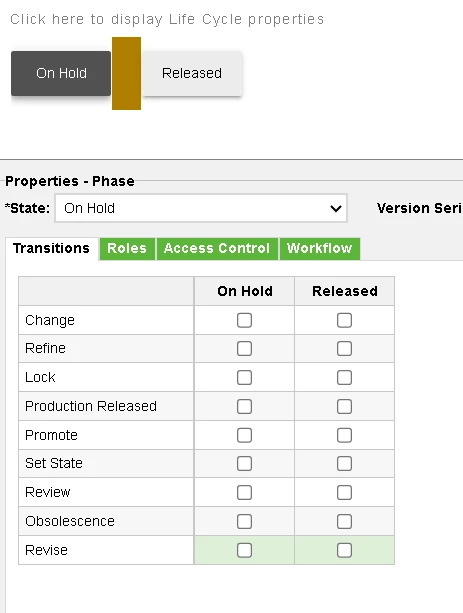
Lifecycle (advanced) 


​​​​

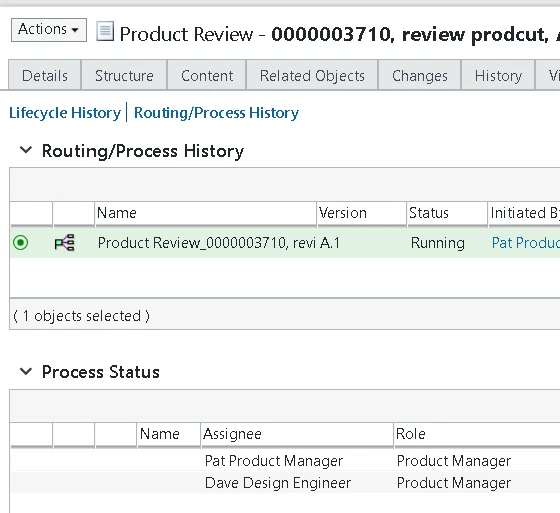
Workflow
 

then once setup the role will be automatically assigned to the product managers and the WF timer Starts.

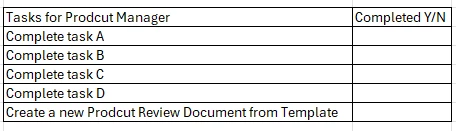
The Document Template will have the instructions to follow (if you ever need to change them just update the template for next time
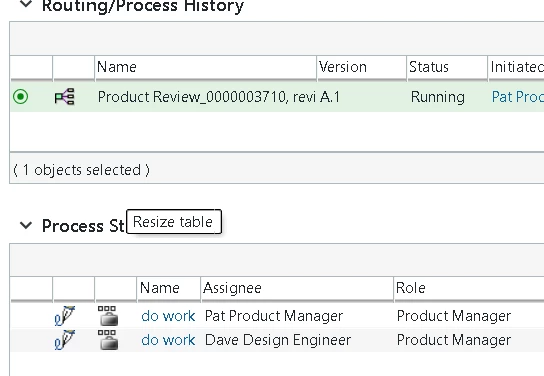
The Timer will wait for X days

Then send the task
 

Doc Template has the Tasks. one of the tasks is to create a new Doc review from Template  

Using asses controls you can hide the doc review subtype from other users.

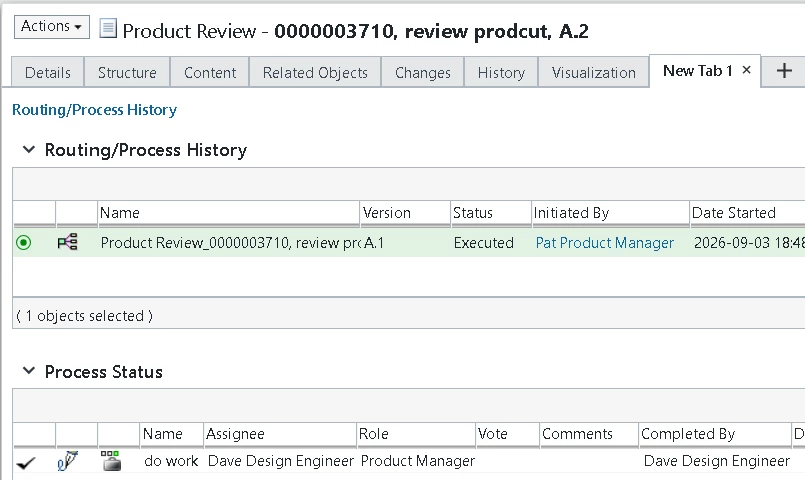
The history and the document metadata give you your audit trail .

hope this helps

6 replies

17-Peridot
September 2, 2026

Interesting, 

Create an advanced lifecycle with a workflow that has a timer. Attach that to a document subtype that has the instructions for the product manager to follow. Once the product manager has completed the tasks, part of the instructions tells them to create another document from template.

All notifications can be created in the task.  


6-Contributor
September 3, 2026

Thanks, this sounds like an interesting approach.

Just trying to understand one thing here. how do we identify all the Product Managers and send the task to each of them?

And once everyone completes their review, is there any way to track who has completed it and who hasn't? kind of audit we can do

Also, the document created from the template after the review — is that supposed to be the confirmation that the Product Manager has completed the review?

Thanks!

BryanK17-PeridotAnswer
17-Peridot
September 3, 2026

Hi,

Below is an example of the setup. 

Lifecycle (advanced) 


​​​​

Workflow
 

then once setup the role will be automatically assigned to the product managers and the WF timer Starts.

The Document Template will have the instructions to follow (if you ever need to change them just update the template for next time
The Timer will wait for X days

Then send the task
 

Doc Template has the Tasks. one of the tasks is to create a new Doc review from Template  

Using asses controls you can hide the doc review subtype from other users.

The history and the document metadata give you your audit trail .

hope this helps

19-Tanzanite
September 8, 2026

So having worked on workflows for 15+ years, I do not see how any of these will repeat every year just because there is a timer at the beginning.  It will sit and wait for for the time before you push to the task and then when all of the tasks are done, it will end.  It will not loop yearly.  You would need to look at something like this, and then I don’t even know that this will work.


17-Peridot
September 8, 2026

It's not supposed to loop. One of the tasks that the product manager will need to do is create another document from template which will start a new process. 

19-Tanzanite
September 9, 2026

That makes sense. But if you wanted one where you didn’t have to depend on someone doing that, then you could do it this way. 😁